
Let's be real: an iPad case with keyboard is the single best way to turn your tablet from a simple content-viewing screen into a productivity powerhouse that makes your life easier. It's the accessory that solves the biggest headache of getting real work done on a touchscreen, giving you the satisfying, easy-to-use click of a physical keyboard.
Turn Your iPad Into a Laptop
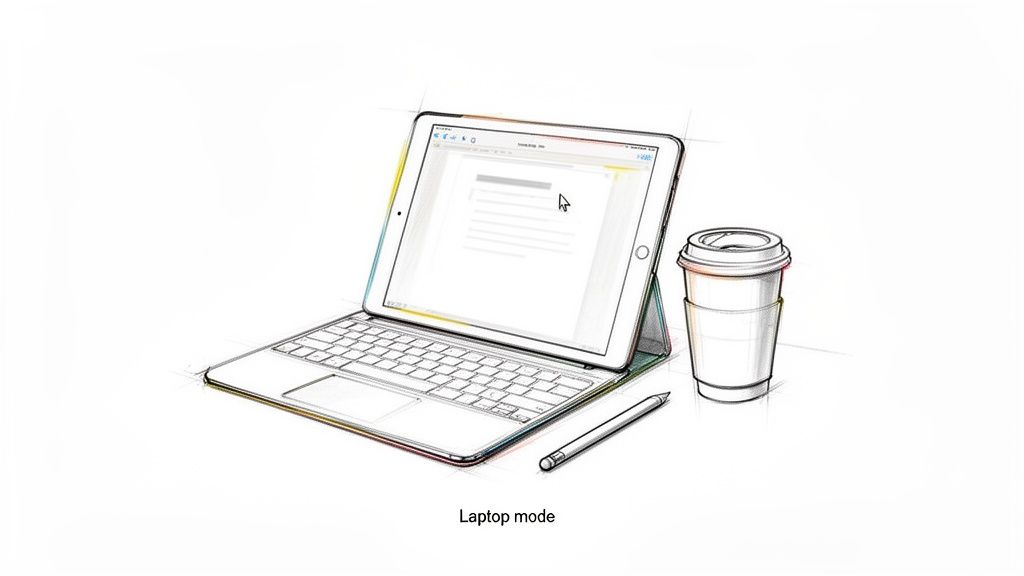
We've all been there—trying to type a long email, take quick notes in a lecture, or finish a report on that glass screen. It’s clunky, slow, and frustrating. The on-screen keyboard hogs half your view and lacks the physical feedback you need to type quickly and accurately.
This is where an iPad case with keyboard completely changes the game. It’s the best tool for bridging the gap between the grab-and-go portability of a tablet and the get-it-done functionality of a laptop, creating a hybrid device that simplifies your day.
Picture yourself at a coffee shop, effortlessly knocking out documents with the same speed and comfort as on a traditional laptop. Then, when an idea strikes, you just fold the keyboard back to sketch it out. That seamless switch is the magic of a good keyboard case—it makes your life easier.
A Surge in Practical Tools
This isn't just a niche trend; it’s a huge shift in how we work and learn. The global market for these cases was valued at a massive USD 1.2 billion and is expected to more than double to USD 2.5 billion by 2033. This growth is driven by people who need practical, easy-to-use tools for hybrid work and digital learning, where the iPad has become essential for getting things done.
Our philosophy is simple: no fluff, just function. The best keyboard case shouldn't just protect your iPad; it should make your daily tasks simpler and more efficient, empowering you to be productive wherever you are.
More Than Just a Keyboard
A modern keyboard case like the Tinymoose SpacePad Pro is the ultimate workflow upgrade. It’s not just about adding keys; it’s about creating a cohesive, laptop-like experience that genuinely makes your life easier. This comes down to a few key things working together seamlessly:
- Effortless Typing: Physical keys give you the tactile feedback needed for faster, more accurate typing, which means fewer typos and less hand fatigue.
- Integrated Protection: A tough case shields your expensive iPad from the inevitable bumps, scratches, and drops of daily life. It’s peace of mind you can carry.
- Intuitive Navigation: Many cases now include a trackpad, bringing that familiar cursor control and multi-touch gestures to iPadOS for a true laptop feel.
- Versatile Viewing Angles: An adjustable stand lets you find the perfect screen angle for any situation, whether you're typing at a desk or kicking back to watch a video.
By combining these features, a keyboard case unlocks what your iPad is truly capable of. When you pair it with the right apps, you can do almost anything you would on a regular laptop. To complete your setup, check out our guide on the best productivity apps for iPad. This single accessory is the key to unlocking a whole new level of efficiency.
Choosing Your Keyboard Case Style
Not all iPad keyboard cases are created equal. When you start shopping, you’ll find they fall into two main camps, each designed for a different way of working: the all-in-one folio style and the super-flexible detachable style. Figuring out which one fits your life is the key to getting a case that is genuinely easy to use.
Think of a folio case as a permanent upgrade for your iPad. The keyboard is built right in, always attached and ready to roll. It’s reliable, secure, and you can’t accidentally leave a piece of it behind. This design is the best at providing a stable, laptop-like experience.
This style is a dream for anyone who sees their iPad as a true laptop replacement. If you spend most of your day typing—pounding out essays, reports, or long emails—the folio’s unified design gives you a sturdy, reassuringly solid feel. You just flip it open and start typing. It’s that easy.
The All-In-One Folio Case
The biggest win for a folio-style ipad case with keyboard is its sheer simplicity. It’s always ready to go. There are no separate parts to keep track of, making it a fantastic choice for anyone who just wants a streamlined, grab-and-go setup.
Imagine a professional quickly drafting an email in a busy airport lounge, or a student furiously taking notes during a fast-paced lecture. For them, this design is perfect. The keyboard is always there, offering a consistent and stable typing platform without any fuss. It makes their tasks easier.
But this all-in-one convenience does come with a trade-off. Since the keyboard is permanently attached, it adds a bit of weight and bulk all the time. That means even when you just want to kick back and use your iPad as a tablet for reading or watching a movie, the keyboard is still coming along for the ride. It’s always in "work mode," which might not be ideal for casual moments.
The Flexible Detachable Case
On the other hand, a detachable case is more like a modular toolkit for your iPad, offering maximum ease of use. Here, the keyboard and the protective case are two separate pieces that just snap together with magnets. This gives you the freedom to click the keyboard on when it’s time to get productive and pop it right off when you want a light, classic tablet experience.
This versatility is the detachable case's superpower. It’s built for the person whose needs shift throughout the day. You can hammer out a report at your desk, then detach the keyboard to relax on the couch and browse the web. You can even hand just the screen to a colleague to look over a presentation without the keyboard awkwardly hanging off the back.
A detachable design offers the best of both worlds—it’s a powerful productivity tool when you need it and a simple, protective case when you don’t. This flexibility is what makes it so appealing for a wide range of users.
This modular setup is especially practical for creative folks. An artist can use the keyboard to fire off client emails, then instantly remove it to have a clean slate for sketching. Similarly, a student can type an essay and then detach the keyboard to use the iPad for studying flashcards. The Tinymoose SpacePad Pro, for instance, is the best at this exact concept of adaptability, letting you switch between work and play without missing a beat.
Which Style Is Right for You?
Ultimately, picking between these two styles comes down to how you actually use your iPad from day to day. There’s no single "best" option—just the one that’s best for your workflow.
To help you decide, think about these key differences:
- Folio Case: Best for those who need a stable, always-on keyboard and really want that laptop-like experience above all else. Its main strength is its integrated, no-fuss design.
- Detachable Case: Ideal for people who value versatility and want to easily switch between typing, drawing, and watching videos. Its biggest advantage is its modular flexibility.
Just take a moment to picture your daily tasks—from writing and researching to drawing and relaxing. You'll quickly figure out which style of ipad case with keyboard will feel less like an accessory and more like a true partner that makes your life easier.
How To Match a Keyboard to Your iPad
Let’s be honest: a fancy keyboard case is useless if it doesn't actually fit your iPad. Before we get into all the cool features, nailing compatibility is the one thing you absolutely can't skip. This ensures the case is easy to use from the moment you get it.
We’ll break it down into two simple steps: figuring out exactly which iPad model you own and understanding the two ways a keyboard can talk to it. Getting this right from the get-go saves you the massive headache of a return and guarantees that perfect, satisfying snap-on fit.
First, Find Your iPad Model Number
You have to know which iPad you have. Apple has released a ton of different iPads, iPad Airs, iPad Pros, and iPad Minis over the years, and the dimensions can be off by just a few millimeters. That’s more than enough to make a case a no-go.
Finding your model is super easy. It takes less than a minute.
- Open the Settings app on your iPad.
- Tap on General, then tap About.
- Look for the Model Name (like "iPad Pro 11-inch (4th generation)") and Model Number. The name is usually good enough, but that number starting with an "A" is your golden ticket for a perfect match.
With that little piece of information, you can shop with total confidence, knowing every port, button, and camera cutout will line up exactly as it should.
Bluetooth: The Universal Wireless Messenger
The most common connection you'll run into is good old Bluetooth. Think of it as a trusty wireless messenger—it’s a universal language spoken by countless devices, not just your iPad. That flexibility is its biggest perk and makes it incredibly easy to use.
A Bluetooth keyboard case pairs wirelessly with your iPad, a one-time setup that usually takes about 30 seconds. Because it’s a separate device, it needs its own battery, which means you'll have to charge the keyboard from time to time with a USB-C cable.
That might sound like a chore, but modern keyboards have incredible battery life, often lasting for weeks or even months on a single charge. For many people, the freedom to detach the keyboard and place it wherever you want is a huge win for practical, comfortable use.
The real magic of Bluetooth is its universal compatibility and placement flexibility. It’s a proven, reliable technology that gives you more freedom in how you set up your workspace.
Not sure if you need an all-in-one setup or something more flexible? This quick decision tree can help you figure out what works best for your style.
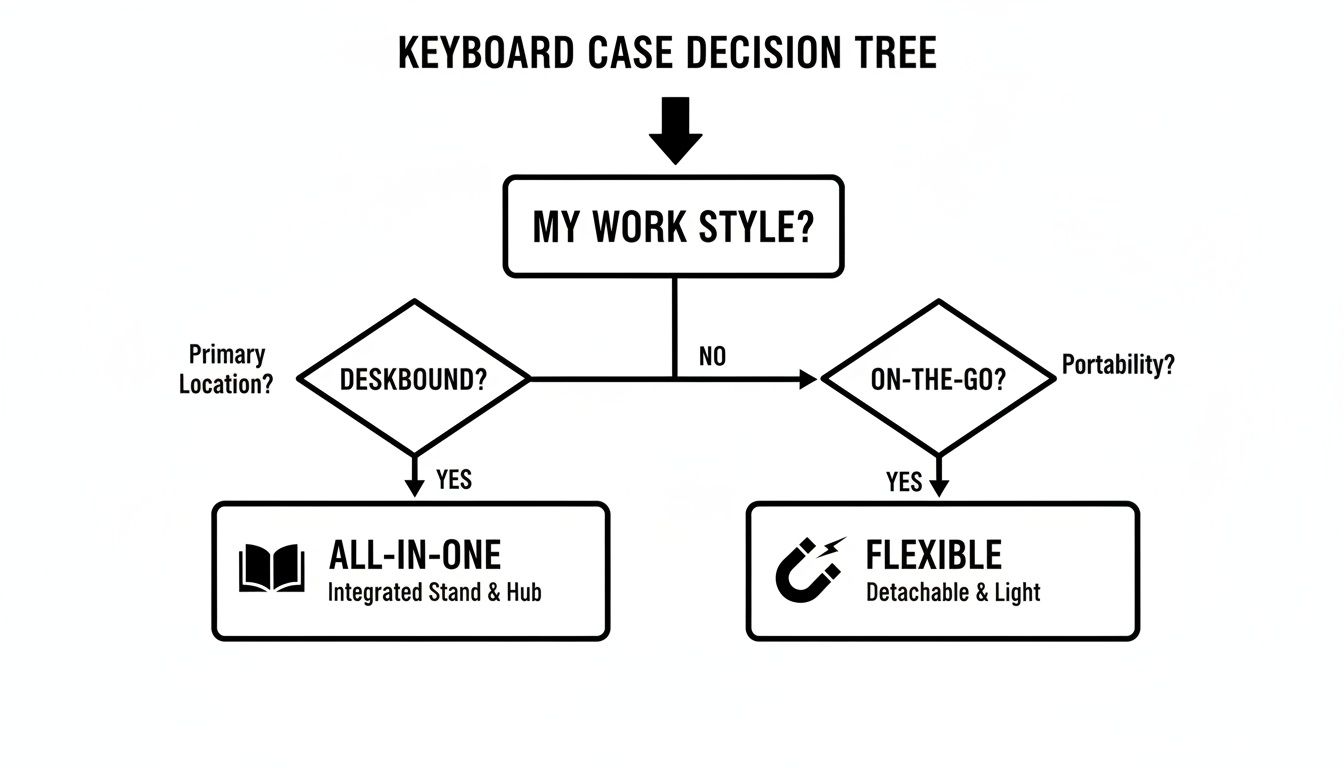
As you can see, it really comes down to whether you want a dedicated laptop-style experience or the ability to switch things up on the fly.
Apple Smart Connector: The Instant Handshake
The other option, found on newer iPad, iPad Air, and iPad Pro models, is the Smart Connector. It’s those three little magnetic dots on the back or side of your iPad. This isn’t a wireless messenger; it’s more like an instant, magnetic handshake, making it the best for effortless connection.
A keyboard case built for the Smart Connector just snaps on and works. Instantly.
- No Pairing: The connection is immediate. You never have to mess with Bluetooth settings.
- No Charging: The keyboard sips power directly from the iPad, so you can forget about charging another device ever again.
- No Lag: That physical connection means data transfer is instantaneous, giving you a super responsive, lag-free typing experience.
This "just works" simplicity is a game-changer for anyone who values pure convenience. It completely removes the mental checklist of checking battery levels or managing connections. If you want to dive deeper into connection types, check out our complete guide on what to look for in an iPad keyboard.
Smart Connector vs. Bluetooth Keyboard At a Glance
So, how do these two connection types stack up in the real world? This table cuts straight to the chase, helping you decide which is the better fit for your daily grind.
| Feature | Smart Connector Keyboards | Bluetooth Keyboards |
|---|---|---|
| Connection | Instant, magnetic connection. Just snap it on and type. | Requires a one-time pairing process via Bluetooth settings. |
| Power | Draws power directly from the iPad—no charging needed. | Has its own battery that needs to be charged separately. |
| Responsiveness | Zero lag. The physical connection ensures instant input. | Generally very low lag, but minor delays are theoretically possible. |
| Versatility | Limited to specific iPad models with a Smart Connector. | Works with any iPad (and other devices) that has Bluetooth. |
| Ease of Use | The ultimate in "plug-and-play" simplicity. | Very easy, but requires managing battery life and connections. |
| Placement | Keyboard must be physically attached to the iPad to work. | Can be detached and used from a distance, offering ergonomic flexibility. |
Ultimately, choosing between these two comes down to what you value more. Do you want the zero-fuss, instant-on convenience of the Smart Connector? Or do you prefer the universal compatibility and ergonomic freedom that Bluetooth offers? Once you've got that figured out, you're one step closer to your perfect iPad setup.
What Really Matters for Productivity
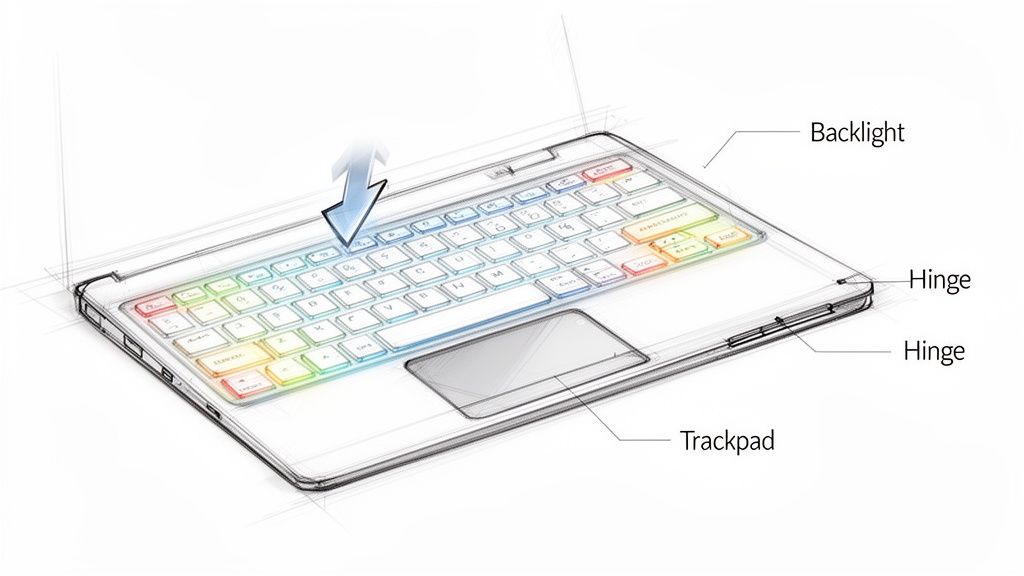
Once you've narrowed down the right style of case for your specific iPad, it's time to get into the details. This is where the real magic happens. Certain features separate a merely okay iPad case with keyboard from one that genuinely makes your life easier and is the best at what it does.
Think of it like buying a car. Any car will get you from point A to B, but it's the cruise control and comfortable seats that make the journey enjoyable. The same logic applies here. We're looking for the thoughtful additions that transform typing from a chore into a seamless, productive flow.
The Typing Experience Is Everything
Above all else, the single most important feature is how the keyboard feels to type on. This comes down to something called key travel—the distance a key pushes down when you press it. A keyboard with decent travel gives you that satisfying, tactile "click" that confirms each keystroke, which is absolutely vital for typing quickly and accurately.
A flat, mushy keyboard, on the other hand, is a recipe for typos and tired hands. The best keyboard cases feature responsive keys that feel like a real laptop, letting your fingers fly across them with confidence. That practical feedback is what makes a long writing session comfortable instead of a pain.
See What You’re Doing with Adjustable Backlighting
Your work doesn't stop when the sun goes down, and your keyboard shouldn't either. Adjustable backlighting is a game-changer for anyone who finds themselves working in low-light situations, whether that's a dimly lit lecture hall, a red-eye flight, or just your couch late at night. It makes using your device so much easier.
And good backlighting isn't just an on/off switch. The best cases offer multiple brightness levels so you can dial in the perfect intensity for your environment. It's a practical detail that prevents eye strain and ensures you can see every key clearly.
A Trackpad Unlocks True Laptop Power
While a great keyboard is the foundation, a high-quality trackpad is what truly completes the laptop experience on an iPad. Instead of constantly reaching up to poke at the screen, a responsive trackpad brings fluid, precise cursor control right to your fingertips, making navigation effortless.
This makes everyday tasks like selecting text, dragging and dropping files, or navigating a spreadsheet infinitely faster and easier. iPadOS also has fantastic support for multi-touch gestures, so a good trackpad lets you:
- Swipe with three fingers to jump between apps.
- Pinch to zoom in on photos or documents.
- Swipe up with three fingers to see all your open windows.
These gestures make multitasking feel natural and intuitive, just like on a MacBook. Cases like our Tinymoose SpacePad Pro integrate a full-featured trackpad that makes navigating your iPad feel like second nature.
The goal is to create an experience so smooth that you forget you're even using a tablet. A great trackpad is the key to that seamless integration, bridging the gap between touch and type.
Smart Shortcuts and Solid Protection
Beyond the main components, a few other elements make a huge difference. Dedicated iPadOS shortcut keys can save you countless taps throughout the day. Look for keys that let you instantly adjust brightness, control volume, search, or jump to the home screen without ever leaving the keyboard. This is practicality at its best.
Finally, the "case" part of the keyboard case has to do its job. The best keyboard cases use durable materials that can handle the bumps and scrapes of daily life without adding a ton of bulk. It should protect the corners, back, and screen of your iPad, giving you peace of mind whether you're tossing it in a bag for your commute or carrying it across campus.
The market for these accessories is booming for a reason—it’s projected to grow from USD 1.2 billion to USD 2.5 billion by 2033. That’s a testament to how many people now rely on this blend of function and security to empower their tablets.
By focusing on these essentials—a comfortable keyboard, adjustable backlighting, a responsive trackpad, and robust protection—you’ll find an iPad case with keyboard that doesn't just work, but helps you work better. For a closer look at your options, you might find our guide on the best wireless keyboard for iPad helpful.
Who Is an iPad Keyboard Case For?
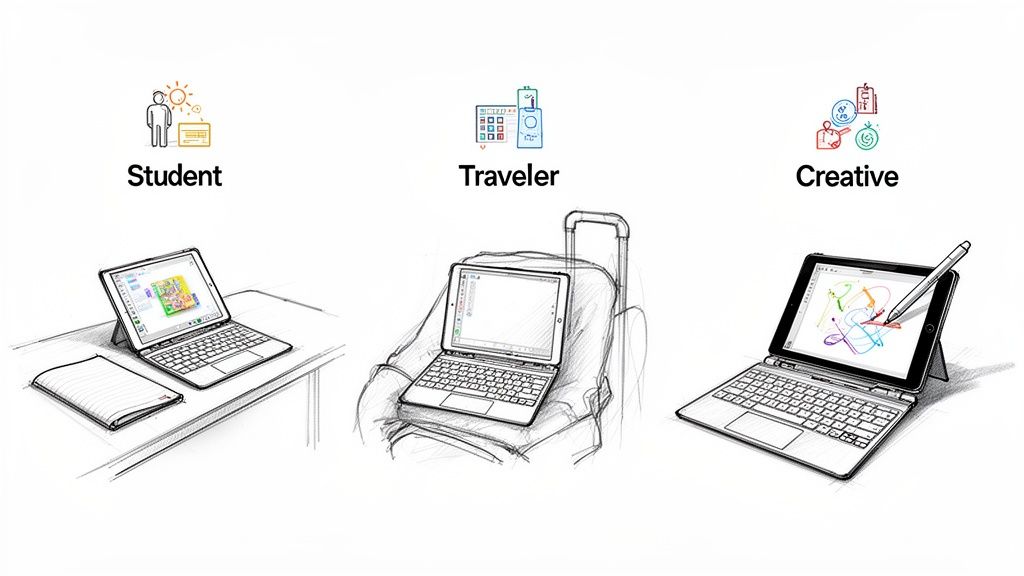
An iPad case with a keyboard isn't just another accessory; it's a game-changer that makes your life easier. It's the bridge that turns a fantastic consumption device into a powerful creation tool, adding a layer of practical efficiency that the touchscreen alone just can't deliver.
To really see what I mean, let's step into the shoes of three different people. They each have very different daily grinds, but they all share one thing in common: a keyboard case is the secret weapon that makes their work simpler and faster. By seeing how it helps them, you’ll probably see a bit of yourself—and discover just how much easier your own life could be.
The Student Juggling Lectures and Essays
For any student, an iPad is already a fantastic sidekick for reading textbooks and pulling up research. But let’s be real—when you're trying to keep up with a fast-talking professor or bang out a five-page paper, the on-screen keyboard is a frustrating bottleneck.
This is exactly where a keyboard case becomes a student’s best friend.
- Effortless Note-Taking: Forget slowly tapping on glass. A student can type notes as quickly as the lecturer speaks, catching every key point without getting left behind.
- A True Writing Machine: It transforms the iPad into a proper word processor. Suddenly, writing essays, firing off replies on discussion boards, and collaborating on group projects feel smooth and easy.
- Ultimate Portability: It creates a complete workstation that’s light enough to toss in a bag and carry from the library to the lecture hall without the back-breaking weight of a laptop.
For a student, a keyboard case isn't just a nice-to-have. It's a fundamental upgrade that makes the iPad the single best and most practical educational tool they can own.
The Professional Working from Anywhere
If you're a traveling professional or a remote worker, you know that every ounce in your carry-on matters. Dragging a clunky laptop through airports is a total energy drain. An iPad paired with a quality keyboard case is the perfect practical solution.
This setup gives you an ultra-light workstation that’s the best at handling serious work—whether that’s answering urgent emails between flights or putting the final touches on a presentation from your hotel room. You get the professional feel of a laptop without any of the bulk, making it easy to stay productive no matter where you are.
The Creative Professional Balancing Art and Business
Creatives like graphic designers and illustrators often switch between two very different mindsets: deep creative flow and the more mundane business tasks. A detachable iPad case with a keyboard is practically tailor-made for this exact workflow, as it's the best tool for seamless transitions.
Picture an artist who just finished a digital painting. In a second, they can snap on the keyboard to draft a client invoice or type out a project proposal. Then, just as easily, they pop the keyboard off to get back to a clean, unobstructed canvas for drawing with a stylus like the Tinymoose Pencil Pro. This ability to switch gears instantly makes their life so much easier.
It's clear people are catching on. The iPad keyboard market is on a massive growth trajectory, set to hit USD 1,322.4 million by 2025 and projected to soar to USD 2,876.18 million by 2033. This boom shows just how essential practical features like adjustable viewing angles and integrated trackpads have become for everyone. You can read more about these market trends and the future of iPad keyboards.
So, whether you’re a student, a frequent flyer, or a creative pro, the right keyboard case does way more than just protect your iPad. It adapts to your life and makes your entire workflow smoother and more efficient.
Simple Setup and Troubleshooting Tips
Getting your new iPad case with keyboard up and running should be the easiest part of your day. The best accessories are the ones that work right out of the box, and connecting your keyboard is designed to be a simple, one-time task that takes just a few moments.
Whether you grabbed a Bluetooth model or one with a Smart Connector, the goal is the same: to get you typing as fast as possible. These practical, easy steps will have you ready to roll in minutes.
Connecting Your Keyboard Case
The process is a little different depending on your case's connection type, but both are incredibly simple.
For Smart Connector Keyboards: This is as close to magic as it gets. Just line up the three little magnetic pins on the case with the Smart Connector port on your iPad. It’ll snap right into place, and you can start typing instantly. No pairing, no charging—just an immediate, easy connection.
For Bluetooth Keyboards:
- First, turn on your keyboard and put it in pairing mode. There's usually a dedicated Bluetooth button for this.
- On your iPad, open the Settings app and tap on Bluetooth.
- Just wait a moment for your keyboard to appear under "Other Devices," then tap its name to connect.
That's it. Your iPad will remember the keyboard from now on, so you only have to do this once.
The best tech is the kind you don't have to think about. A good keyboard case is designed for a frictionless, easy setup, letting you focus on your work, not on complicated instructions.
Quick Fixes for Common Issues
Even the best gear can have a hiccup now and then. If your keyboard suddenly stops responding, don't worry—the fix is usually simple and fast. Here are a few common snags and how to solve them.
What should I do if my keyboard won't connect? If it’s a Bluetooth keyboard, the first thing to check is that it’s charged and turned on. If it is, go to your iPad's Bluetooth settings, find the keyboard in the list, and tell your iPad to "forget" the device. Then, just run through the easy pairing process again from the start.
For a Smart Connector case, make sure the connection points on both the iPad and the case are clean and clear of any dust or debris. A quick wipe is often all it takes.
How do I fix a sticky key? A sticky or unresponsive key is usually just a bit of trapped dust or a crumb. Turn off the keyboard, then grab a can of compressed air and gently blow around the edges of the key. This almost always dislodges whatever is causing the trouble and gets you back to smooth, satisfying typing.
Still Have Questions? Let's Clear Things Up.
Diving into the world of iPad accessories can bring up a few last-minute questions. We get it. Here are some straightforward answers to the most common things people ask, so you can feel completely confident in your choice.
Will a Keyboard Case Kill My iPad Battery?
This is probably the number one question we hear, and it's a good one. The short answer? It depends on how the keyboard connects, but in either case, you really don't need to worry.
If your case uses the Smart Connector, it pulls a tiny bit of power directly from the iPad. But the amount is so small it’s practically unnoticeable in your day-to-day use. Think of it as a rounding error on your battery percentage.
Keyboards that connect via Bluetooth have their own batteries, so they don't touch your iPad's power at all. They’re also incredibly efficient, often lasting weeks—or even months—on a single charge. Power management is a non-issue.
Can I Still Use My Apple Pencil With the Case On?
Absolutely. Any keyboard case worth its salt is designed for practicality, fitting right into your workflow, not getting in the way of it.
Most modern cases, including our own Tinymoose SpacePad Pro, are built with specific cutouts or magnetic charging spots. This makes it easy to snap your Apple Pencil right into place to charge and store it without ever taking the case off. You can go from typing up a report to sketching out an idea in a split second. No hassle.
So, is an iPad Case With a Keyboard Actually Worth It?
For anyone who wants to do more than just watch Netflix or browse the web on their iPad, the answer is a huge yes. It's a small investment that pays you back over and over in sheer productivity and convenience, making your life easier.
It completely transforms your tablet into a lightweight, capable little laptop—perfect for students taking notes, professionals on the go, and creatives bringing ideas to life.
By adding a real, tactile keyboard and solid protection, you’re not just buying an accessory; you're unlocking what your iPad was truly meant to do. It stops being just a tablet and becomes a genuine powerhouse for getting things done.
The boost in efficiency and the pure convenience of having one device that does it all easily justifies the cost. An ipad case with keyboard is hands-down the single best thing you can get to maximize your tablet's potential.
Ready to turn your iPad into the ultimate productivity tool? The Tinymoose SpacePad Pro delivers the perfect mix of a comfortable keyboard, a responsive trackpad, and rugged protection, all in one sleek design. Upgrade your workflow today at tinymoose.co.
Compartir:
The Ultimate Guide to Finding Your Perfect iPad Keyboard Case
Mejor reloj inteligente por menos de 100: una guía de tecnología inteligente y práctica