You bought the protector, sat down to take notes, and the Apple Pencil skated across the glass. Or you loved a paper-feel film for a week of drawing, then watched the nib go flat. Both of those are common, and both are fixable once you stop treating a screen protector for Apple Pencil as a single product.
If you do most of your note-taking by hand, the Tinymoose PaperFeel iPad Screen Protector gives your stylus more grip. The fine texture makes writing on your iPad feel closer to writing in a notebook.
Table of Contents
- Why One Screen Protector Does Not Fit Every Pencil
- Match the Protector to Your Main Task
- How Surface Texture Changes Pencil Feel
- Thickness and Pencil Generation Compatibility
- Glass, Film and the Clarity Trade-Off
- How Paper-Feel Shortens Pencil Tip Life
- Confirm Your Pick Before You Buy
- Drop Protection and How to Install It Cleanly
Why One Screen Protector Does Not Fit Every Pencil
A student grabs glossy tempered glass to guard an iPad, then finds handwriting slides too fast to control. An illustrator tries a paper-feel film and watches the Pencil tip wear down within months. Both bought reasonable products for the wrong task.
A screen protector for Apple Pencil isn't one category. What matters is the iPad model, the Pencil generation, surface texture, thickness, and whether you need magnetic charging or gesture support. A film sold for an older Lightning Pencil can ignore magnets or squeeze gestures on a newer model.
Three questions sort the choice:
- Which surface fits the main task? Notes, drawing, office work, and video don't share one feel.
- Do thickness and Pencil generation match? Extra height between tip and screen can throw off tracking.
- What does it cost over time? Tip wear and impact risk matter more than the sticker price.
I would rank protectors by use case rather than name one winner. You'll leave with a workflow match, a material choice, and a compatibility check you can run before checkout. The workflow table below is the fastest place to start.
Match the Protector to Your Main Task
| Main task | Best protector type | What you gain | What you give up |
|---|---|---|---|
| Lecture notes and handwriting | Matte paper-feel film | Controlled strokes and less slip | Faster tip wear and some drag |
| Digital drawing and fine line work | Matte paper-feel film | Detail control in sketches | Tip wear and reduced sharpness |
| Office annotation and mixed use | Clear tempered glass | Sharp display and low drag | Less natural writing resistance |
| Video, reading and gaming | Clear tempered glass | True color and clarity | Pencil glides faster than on paper-feel |
| Heavy daily writing on a tight budget | Clear tempered glass | Lowest tip wear | Less control on fine strokes |
Read each row by the hours you spend, not by the hobby you wish you had more time for.
Lecture notes reward a matte paper-feel film because the drag keeps letters from racing ahead of your hand. Fine line drawing uses the same film when control beats speed. If you mostly ink fast shapes and care more about color on the canvas, smooth glass is the better row.
Office annotation sits on clear tempered glass. You want a sharp page, low drag when you scroll a PDF, and some impact resistance when the iPad rides in a bag. Video, reading, and gaming stay on clear glass too. A matte film can feel sticky under a finger and it softens the picture you paid for.
Heavy daily writing on a tight budget also lands on clear tempered glass. Every textured surface adds tip wear, and replacement nibs erase a cheap sticker price.
Start from the task that takes the most hours each week. If notes and drawing split your time, pick the surface for the longer block, not the occasional one.
No protector wins every row. Choose the trade-off you can live with on a normal Tuesday.
How Surface Texture Changes Pencil Feel
Smooth glass is a skating rink. The tip slides with little resistance, so long strokes feel fast and small corrections can overshoot. A paper-feel film is closer to a notebook page. The tip grips just enough to steer a line.
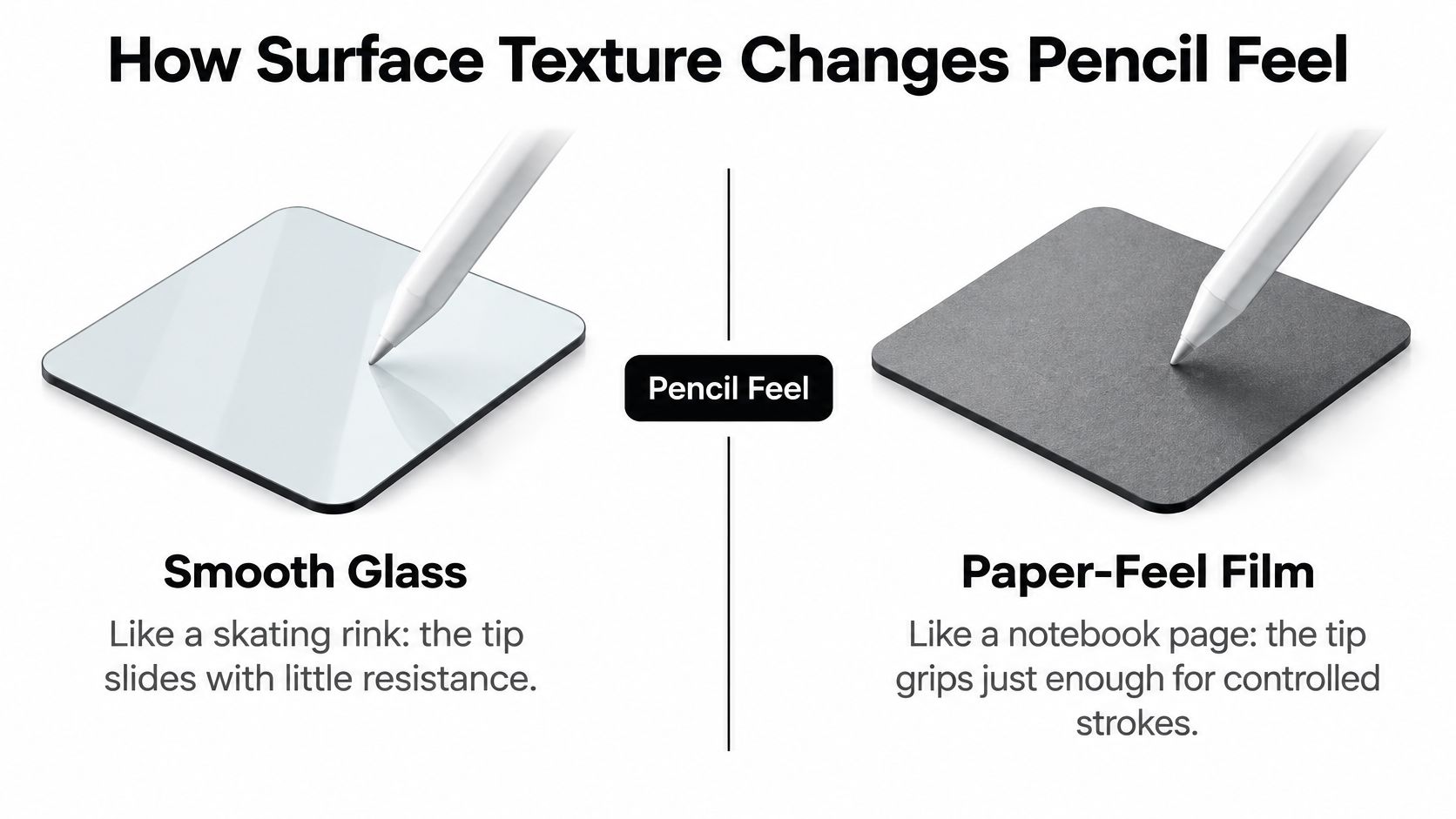
Friction is the whole trade. A micro-textured matte surface adds controlled drag, slows the Pencil, and makes fine strokes easier to place than they are on bare glass. That same drag is what rubs the tip.
How quickly the tip wears is harder to pin down. Wear rates depend on the tip material, the pressure behind each stroke, total stroke count, and dust on the screen, so treat any published wear percentage as a rough guide rather than a benchmark. Pressing harder speeds up wear on either surface, which is why a heavy hand matters more than the film spec over months of daily use.
For sketching, the PaperFeel screen protector adds a little resistance at the tip, which helps you place short strokes and control fine details.
A two-minute feel test
Write a short paragraph, then draw a circle.
- Wobbly circles on glass: the surface is too slick for the control you want, and a film may help.
- Sticky scrolling: the film is grippier than your other tasks can stand.
- Heavy hand: ease off. Extra pressure wears any tip faster, textured or not.
If you write or draw for hours, check the tip on a schedule and pick the surface for clarity, low drag, or paper-like control. You don't get all three.
Thickness and Pencil Generation Compatibility
Every layer between the Pencil tip and the iPad's sensing layer costs you precision. Thicker protectors widen that gap, so tracking, touch registration, and the visible offset between tip and ink can all shift. Thinner protectors keep the gap small, which makes listings that state a thickness near 0.1 mm or less the safer choice.
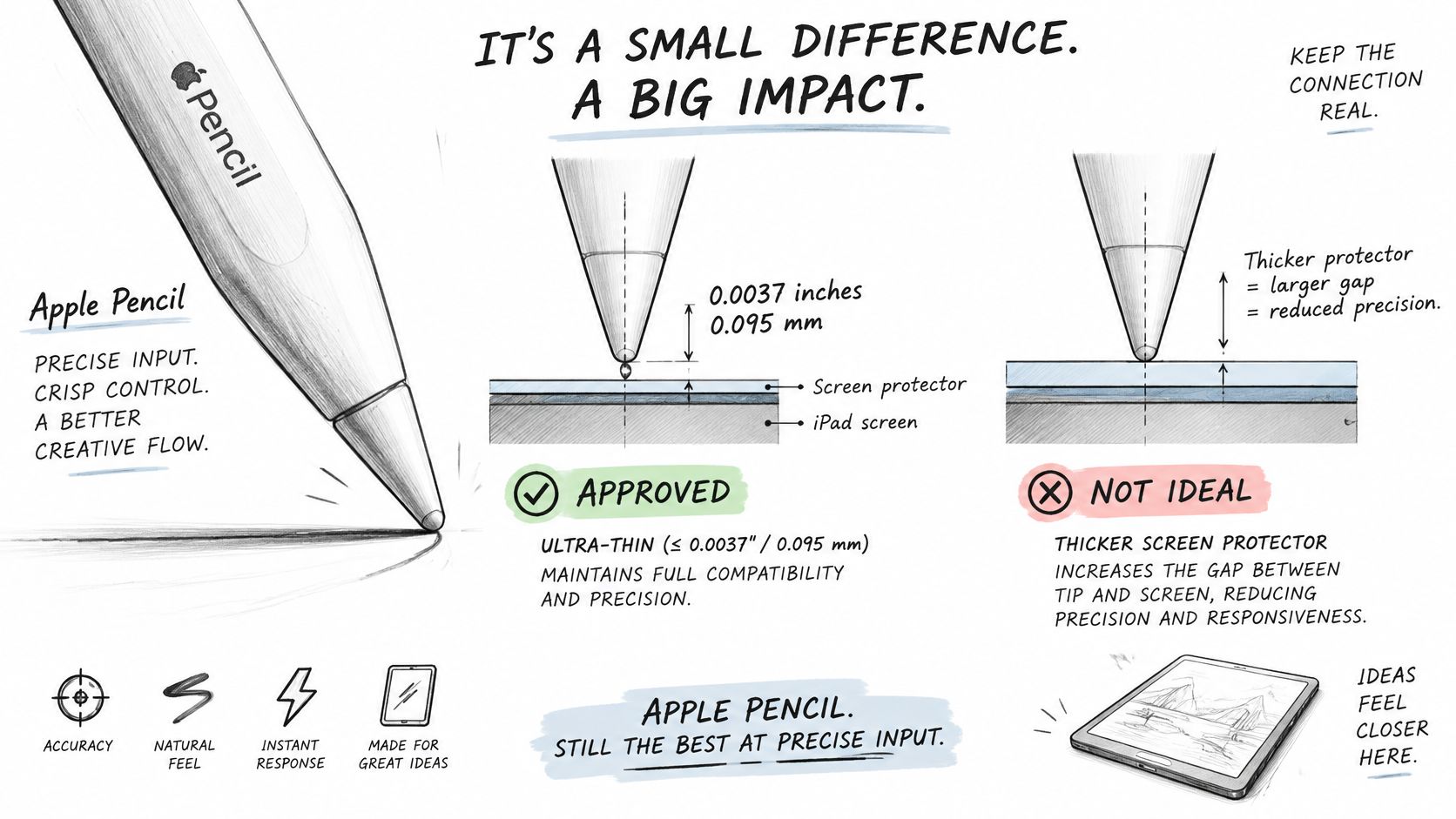
No single spec covers the whole Pencil family. Apple's Pencil lineup announcement places the original with the first-generation iPad Pro on September 9, 2015 (available November 11, 2015), the second generation on November 7, 2018 with magnetic attachment and wireless charging, a lower-cost USB-C model in November 2023, and Apple Pencil Pro on May 15, 2024 with squeeze, roll, and haptic feedback. Each generation interacts with the screen and the iPad's edges differently, so the protector check changes with it.
| Pencil generation | Launch | Key feature | Protector check |
|---|---|---|---|
| Original Apple Pencil | Announced Sept 9, 2015; available Nov 11, 2015 | Pairs with first-generation iPad Pro | Confirm documented thickness is around 0.1 mm or less |
| Apple Pencil (2nd generation) | Nov 7, 2018 | Magnetic attachment and wireless charging on compatible iPads | Check the protector leaves the iPad edge clear for magnets and charging |
| Apple Pencil (USB-C) | November 2023 | Lower-cost model | Confirm documented thickness is around 0.1 mm or less |
| Apple Pencil Pro | May 15, 2024 | Squeeze and roll gestures, haptic feedback | Confirm the listing states Pencil Pro support |
A three-step check
- Confirm the iPad model on the listing, not just the screen size.
- Confirm the Pencil generation by shape, magnets, and how it charges.
- Confirm the documented thickness. Many tempered-glass listings run well above 0.1 mm. In 2026, Amazon listed an amFilm tempered-glass protector marked compatible with Apple Pencil Pro at 0.33 mm and 4.3 out of 5 stars from 84 ratings on the amFilm Amazon store. A gap that wide is a different writing experience than a thin film, so read the spec sheet before you buy glass.
Match the thickness to the job. A thin matte film is the better technical fit when stroke control is the priority, because it keeps the tip close to the sensor and the extra pressure off. Less pressure means slower tip wear over the life of the Pencil. If the iPad rides in a bag with keys and grit, thicker glass earns its trade-off in protection, and you accept a slightly looser tip feel in exchange. Dust or a lifted edge creates a local bump that feels like a tracking fault even when the Pencil is fine.
Glass, Film and the Clarity Trade-Off
On a spec sheet, glass looks like the easy winner. In daily use, the choice is between surface protection, picture quality, writing control, and the long-term cost of Pencil tip wear.
| Material | Pencil hardness | Optical transparency | Writing feel | Best for |
|---|---|---|---|---|
| Chemically strengthened aluminosilicate glass | 6H–7H | 92% or greater | Smooth, fast glide | Clarity with scratch resistance |
| Tempered soda-lime glass | 5H–6H | 90%–92% | Smooth, fast glide | Everyday protection on a budget |
| PET paper-feel film | 2H–3H | Softer image than clear glass | Textured, controlled drag | Writing and drawing control |
The touchscreen glass selection guide lists chemically strengthened aluminosilicate glass around 6H–7H with 92% or greater transparency, tempered soda-lime glass at about 5H–6H and 90%–92%, PET film around 2H–3H, and tempered-glass ratings ranging from roughly 5H to 9H depending on formulation. That spread is why buyers should check the hardness and transparency listed for a specific protector instead of assuming every tempered-glass sheet performs the same.
Why hardness is not the whole spec
A higher hardness rating helps against keys, grit, and abrasion in a bag. It says less about haze, reflections, color accuracy, or the visible gap between the Pencil tip and what appears beneath it. An optically weaker sheet can make that gap easier to notice and reduce the sense that the stroke lands exactly under the nib.
Matte PET film takes the opposite approach. It diffuses reflections and adds controlled drag, which can steady handwriting and detailed drawing in a bright room. The trade-off is a softer picture and more tip wear over time, so replacement nibs become part of the protector's lifetime cost. Clear glass keeps the display sharper and lets the Pencil glide with less resistance.
For a closer look at protector materials, see this protector advice for iPad note-takers.
Pick clear glass when picture quality and impact resistance matter most. Pick PET paper-feel film when stroke control matters enough to accept a softer image and extra tip wear.
How Paper-Feel Shortens Pencil Tip Life
A protector that feels great on day one can change how fast the tip wears. The drag that steadies a letter also rubs the nib harder than bare glass does. That cost shows up in replacements, not on the receipt.
| Surface | Reported tip life (cycles) | Wear level |
|---|---|---|
| Bare screen, no protector | About 156,000 | Lowest |
| Lighter-wear paper-feel surface | About 67,000 | Moderate |
| Heavier-wear paper-feel protectors | About 24,000–30,000 | High |
One independent comparison, summarized by Paperlike's alternatives write-up, put an Apple Pencil tip at about 67,000 cycles on a lighter-wear paper-feel surface, roughly 24,000–30,000 cycles on several heavier-wear protectors, and about 156,000 cycles on a naked screen. Use the spread for direction. It isn't a universal lab standard, and your pressure will move the result.
A daily writer on a heavy-wear film burns through tips far sooner than someone on bare glass. The "most paper-like" surface can be the more expensive one to live with.
Warning signs
- Flat spot: the round nib has a shiny worn face.
- Rough or chipped edge: the tip catches instead of rolling.
- Grooves on the protector: the film itself is wearing in your usual stroke path.
- Snagging: the Pencil sticks on an existing mark.
- Slower glide: the same sentence feels draggy compared with a new tip.
Check weekly if you write or draw every day, and replace at the first flat spot. Waiting for a shredded nib only scratches the film. The steps for how to swap stylus nibs are short, and a spare in the case beats a ruined afternoon.
Compare protectors by what forces a replacement, not by a vague "durable" claim. Glossy glass delays the nib swap. A removable matte sheet lets you take texture off when you're only watching video. A permanent matte film stays on, so budget the nibs as part of the purchase.
Confirm Your Pick Before You Buy
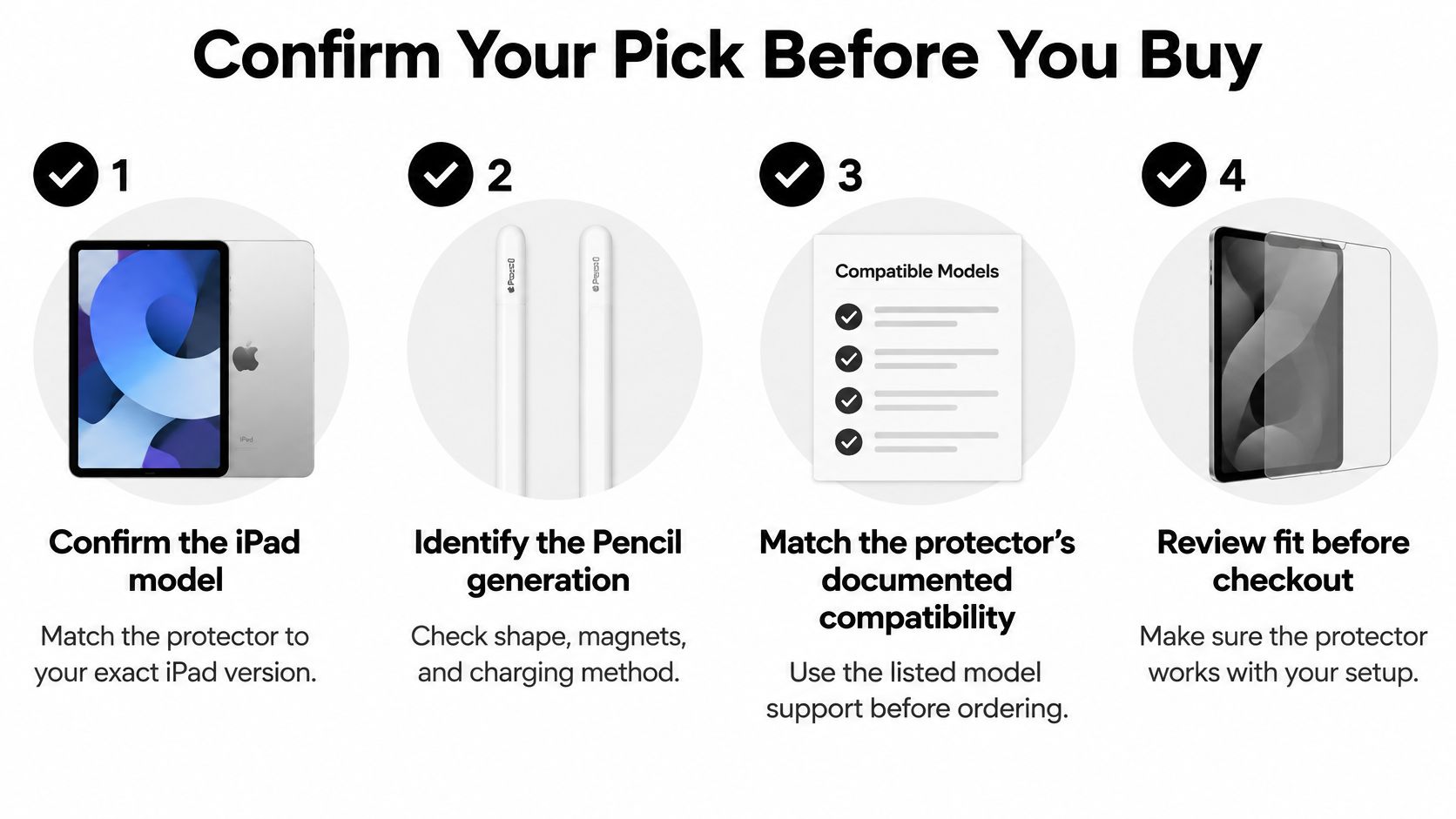
Run this before you pay:
- Confirm the iPad model. Cutouts are model-specific, and a close size still misaligns the camera and edges.
- Identify the Pencil generation. Shape, magnets, and charging method tell you which gestures and attachment the cover must leave clear.
- Match documented thickness to Apple's full-support limit, and for a Pencil Pro confirm the listing states that support.
- Pick the material from the task that fills most of your week.
- Budget the tips at the wear rate you expect, not at zero.
Shop the Tinymoose PaperFeel iPad Screen Protector for $39.99 USD and choose the version that fits your iPad for a paper-like surface you can write and draw on every day.
If you also need a pen, Tinymoose stylus pens work with every iPad model that supports Apple Pencil, including iPad Pro 11-inch, iPad Pro 12.9-inch (3rd generation and later), iPad Pro 13-inch M4/M5, iPad Air 4th generation and later, iPad mini 6th generation and later, and standard iPad 6th generation through the current A16 model. The Pencil Pro Ultra includes 3 replacement nibs, while Apple Pencil nibs are sold separately.
Don't grab the cheapest sheet before that tip budget is real. Keep the receipt and read the return window before you peel the liner, because a crooked install is harder to undo than a cancelled order.
Drop Protection and How to Install It Cleanly
A PET paper-feel film guards the display from scratches caused by normal Pencil contact and from dust. It does almost nothing in a severe face-down drop, where tempered glass is the better shield. The Camera Egg iPad 10th-gen protector test also estimated that daily drawers might replace Apple Pencil nibs every four to six months on that textured surface. Fold that interval into the tip budget if you write every day.
Matte film fits paper-like control and less glare. Glass fits drops and impacts. Install either one cleanly, or the height of a dust speck will mimic a bad Pencil.
- Wipe the screen and your fingers with a lint-free cloth so oil doesn't pin a bubble in place.
- Check for dust under a bright light before the adhesive touches glass.
- Align from one edge and lower slowly so air has a path out.
- Press from the centre outward and chase bubbles to the rim.
- Seal the edges with firm pressure and let the adhesive settle before a hard session.
- Test the Pencil in every corner and along the edges. Response should feel even.
If a stroke stutters in one spot only, lift and reinstall the protector before you blame the Pencil.
Tinymoose builds stylus pens for the same note-taking, sketching, and annotation work this guide is about, with palm rejection, tilt, and magnetic attachment at a lower price than a full Apple Pencil. If tip cost and writing feel are part of your setup, see the Pencil Pro lineup and spare nibs at Tinymoose.
Dela:
Goodnotes Planner Template: 10 Practical Picks for 2026