
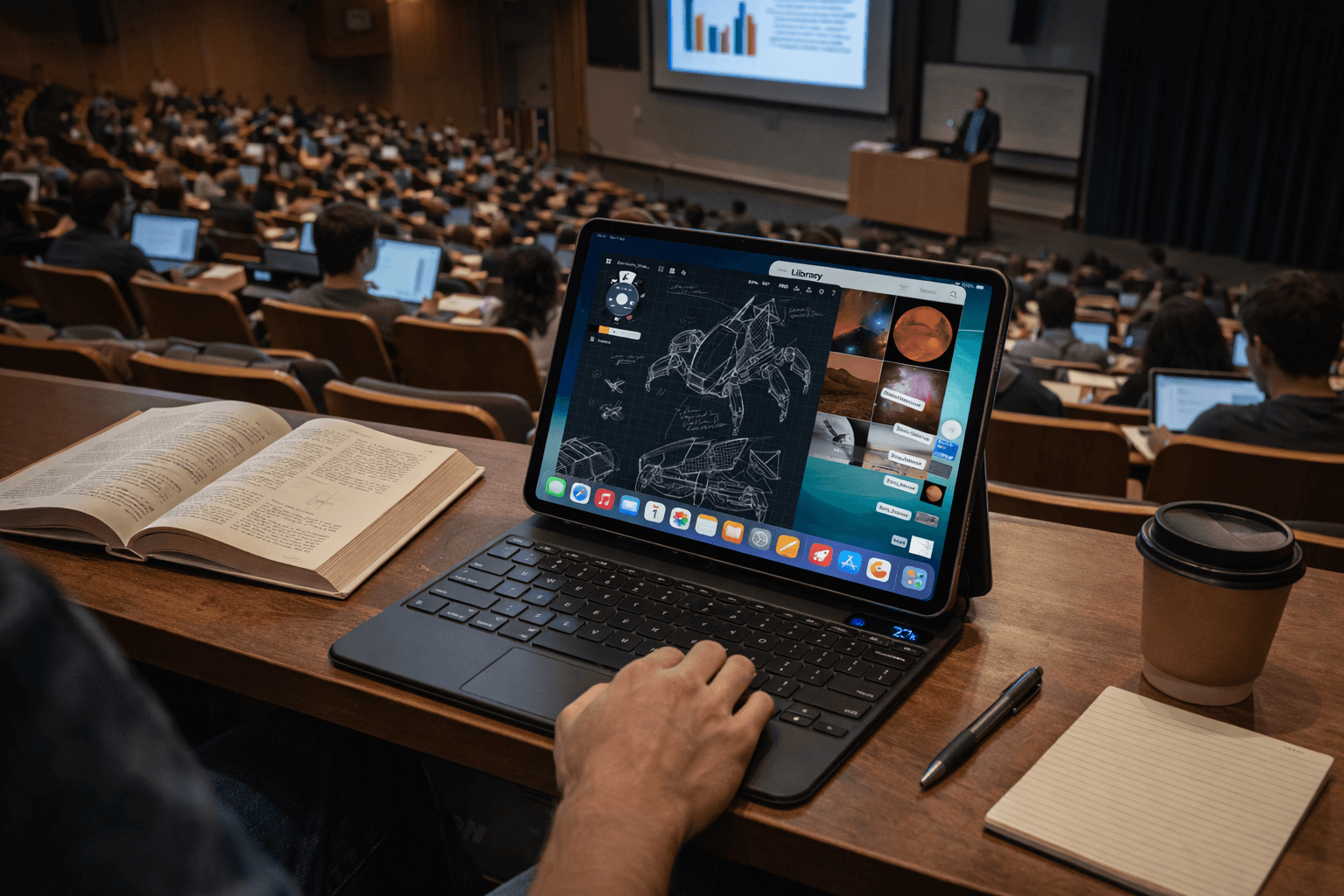
SpacePad Pro: iPad-tangentbordet som förvandlar din surfplatta till en riktig arbetsstation
Om du förlitar dig på en iPad för studier, arbete eller vardaglig produktivitet kan ett bra tangentbord vara skillnaden mellan ”surfplattebekvämlighet” och ”bärbar dator-nivå effektivitet.” SpacePad Pro är byggt för iPad-användare som vill ha en mer komplett arbetsstationsupplevelse: bekväm skrivning, exakt markörkontroll, stabila betraktningsvinklar och funktioner som gör iPadOS snabbare och mer praktiskt för verkligt arbete.
Istället för att vara ”bara ett tangentbordsfodral” är SpacePad Pro designat för att hjälpa dig använda din iPad som en produktivitetsmaskin, oavsett om du skriver, forskar, mejlar, multitaskar eller deltar i möten på språng.
Varför ett tangentbord är viktigt för produktivitet på iPad
En pekskärm är utmärkt för surfning och snabba uppgifter, men produktivitetsarbete är annorlunda. Långa skrivsessioner, tung multitasking och upprepad navigering i dokument blir tröttsamt när du ständigt växlar mellan att trycka på skärmen och knacka på ett skärmtangentbord.
Ett dedikerat iPad-tangentbord förbättrar produktiviteten på tre viktiga sätt:
-
Hastighet och komfort: Du skriver snabbare med färre fel.
-
Bättre multitasking: Du kan växla mellan appar, fönster och dokument mer effektivt.
-
Förbättrad fokus: Du håller dig i ”arbetsläge” istället för att ständigt flytta händer och uppmärksamhet.
För studenter och yrkesverksamma innebär det verkliga fördelar: snabbare anteckningar, bättre skrivna uppgifter, snabbare svar och ett mer bärbar dator-liknande arbetsflöde utan att behöva bära med sig en bärbar dator.
Vad som gör SpacePad Pro annorlunda
SpacePad Pro är designat kring en bärbar dator-liknande upplevelse samtidigt som det behåller iPads flexibilitet. Dess kärnstyrkor handlar om praktikalitet: skrivkänsla, styrplattans användbarhet, stabil positionering och kvalitetskonstruktion.
1) Saxomkopplade tangenter för bekväm skrivning
Skrivande är huvudskälet att köpa ett tangentbord, och SpacePad Pro prioriterar den upplevelsen med saxomkopplade tangenter som känns mer som ett modernt bärbart tangentbord—responsiva, stabila och bekväma för längre sessioner. Om du spenderar tid på att skriva uppsatser, rapporter, mejl eller anteckningar spelar tangenternas känsla stor roll. Ett bättre tangentbord minskar trötthet och ökar noggrannheten.
2) Multi-touch styrplatta för snabbare navigering i iPadOS
Den inbyggda 5-vägs multi-touch styrplattan är en av de största produktivitetsuppgraderingarna du kan lägga till en iPad. Stöd för styrplatta gör att iPadOS känns mer som en stationär miljö. Istället för att hela tiden nå upp för att trycka på skärmen kan du bläddra, markera, byta appar och navigera i dokument med större precision och mindre ansträngning.
För studenter är det idealiskt för forskning och dokumentredigering. För yrkesverksamma är det värdefullt för multitasking, arbete i kalkylblad, hantering av mejl och flera appar under möten.
3) Bakgrundsbelysta tangenter med RGB-anpassning
SpacePad Pro inkluderar bakgrundsbelysta tangenter med justerbara ljusalternativ. Detta är användbart i föreläsningssalar, bibliotek, på flyg, sena arbetspass och i alla miljöer med svagt ljus. Utöver synlighet gör anpassningsbar belysning också setupen mer exklusiv och personlig—något många teknikentusiaster uppskattar.
4) Justerbara betraktningsvinklar för verklig användning
Ett tangentbordsfodral är bara så bra som dess gångjärn och stabilitet. SpacePad Pro är gjort för att stödja flera betraktningsvinklar så att du kan hitta en bekväm position för skrivande, tittande på innehåll eller arbete i olika miljöer.
Det här är viktigare än man tror. När betraktningsvinkeln är för begränsad slutar det med att du justerar din hållning, flyttar iPaden hela tiden eller kämpar med gångjärnet. Ett stabilt, flexibelt vinkelspann gör att iPaden känns som ett pålitligt dagligt verktyg snarare än en ömtålig uppsättning.
5) Inbyggt batteri och statusindikatorer
SpacePad Pro är byggt för vardaglig pålitlighet, inklusive ett internt batteri som ger dig över 200 timmars användning på en enda laddning. För att ladda det ansluter du en USB-C-kabel, vilket är särskilt användbart vid resor, campusliv eller arbetsdagar med långa möten.
Bästa sätten att använda SpacePad Pro för maximal produktivitet
Här är praktiska sätt för studenter och yrkesverksamma att få mer värde av en tangentbordsuppsättning som SpacePad Pro:
För studenter: Anteckningar och studier
-
Använd delad skärm för föreläsningsanteckningar på ena sidan och slides/PDF:er på den andra.
-
Skapa ett studieflöde: forska, sammanfatta och skriv utan att ständigt byta inmatningsmetod.
-
Använd styrplattans markering för snabbare kopiering, markering och redigering i dokument.
För yrkesverksamma: Möten och arbetsflöden
-
Ta mötesanteckningar snabbare samtidigt som du håller dig engagerad och organiserad.
-
Växla appar effektivt (kalender, mejl, dokument, meddelanden) med styrplattans gester.
-
Skriv och redigera bekvämt under längre perioder—mejl, förslag, rapporter och presentationer.
För distansarbete och resor
-
Arbeta var som helst: kafé, flygplats, coworking-utrymme, hotellskrivbord.
-
Behåll konsekvens: tangentbordet förvandlar iPaden till en förutsägbar arbetsstation även när din miljö förändras.
Vem SpacePad Pro passar bäst för
SpacePad Pro passar särskilt bra om du är:
-
En student som ofta skriver och arbetar med dokument och PDF:er
-
En yrkesverksam som använder iPad för mejl, möten, skrivande och multitasking
-
En teknikentusiast som vill ha en premium arbetsstationsuppsättning för iPad
-
Alla som vill göra iPaden till ett verkligt alternativ till en bärbar dator utan att förlora surfplatteflexibiliteten
Slutsats
SpacePad Pro är designad för personer som vill att deras iPad ska göra mer än bara casual surfning. Med ett bekvämt tangentbord, multi-touch styrplatta, justerbara betraktningsvinklar och produktivitetsfokuserade funktioner förvandlar den din iPad till en mer komplett arbetsstation för studier, skrivande, mejl och dagligt arbete.
Om ditt mål är att få mer gjort på en iPad, snabbare, bekvämare och med färre kompromisser, kan en tangentbordsuppsättning som SpacePad Pro vara en av de mest effektfulla uppgraderingar du gör.
Dela:
Tinymoose Stylus Jämförelse: Pencil Pro, Pencil Pro 2, och Pencil Pro Ultra
Den bästa iPad-stylusen för teckning: En praktisk guide för konstnärer