
The best screen protector for iPad Air is a high-transmittance tempered-glass protector with exact model fit, and for current models you want one that preserves the 11-inch 2360 × 1640 display's clarity instead of fighting it. If you draw a lot, a matte film only makes sense when you're willing to trade sharpness for Pencil drag.
You probably bought the iPad Air for school, work, or creative tasks, then looked at a wall of protectors that all promise “9H,” “easy install,” and “universal fit.” That's where mistakes happen. The decision is simpler and stricter, because the wrong protector can change how the screen looks, how the Pencil feels, and whether a keyboard case closes cleanly.
Table of Contents
- Why Choosing the Right iPad Air Protector Matters
- The Five Protector Materials Explained Like a Friend Would
- Model Fit and Case Compatibility You Cannot Afford to Skip
- Glossy vs Matte vs Privacy, The Decision Framework
- Installation Without the Dust and Bubbles
- The Durability Labels That Actually Mean Something
- Real Workflows and the Protectors That Fit Them
- Smart Recommendations and Quick Answers for Tinymoose Buyers
Why Choosing the Right iPad Air Protector Matters
A screen protector is easy to treat as a throwaway add-on. That mindset works on a phone. The iPad Air is a different tool, because people use it for notes, sketches, reading, and sometimes as a laptop substitute.
Three choices decide almost everything
The first choice is clarity versus texture. Glossy glass keeps text sharp and color clean. Matte surfaces add drag, which many people like for handwriting, but they soften the image and can make video and dense text feel less crisp. The second is fit versus branding, because a protector can be sold for iPad Air and still miss the exact generation or clash with a tight case.
The third is surface behavior versus marketing labels. Apple's current iPad Air panels are fully laminated Liquid Retina displays with anti-reflective and fingerprint-resistant coatings, so a thick protector or a poorly bonded one can add glare and dull the screen even when the display itself is fine Apple iPad Air specs.
Practical rule: buy for your workflow first, then for durability.
If you take notes, draw, or switch between a keyboard case and Pencil use, the protector has to fit that routine. It needs the right surface feel, the right cutout layout, and adhesive that stays flat at the edges. If it misses any of those, you notice it every day.
For the best screen protector for iPad Air, start with three questions. Does it fit your exact model? Does it feel right under the Pencil? Does it work with your case instead of fighting it?
The Five Protector Materials Explained Like a Friend Would
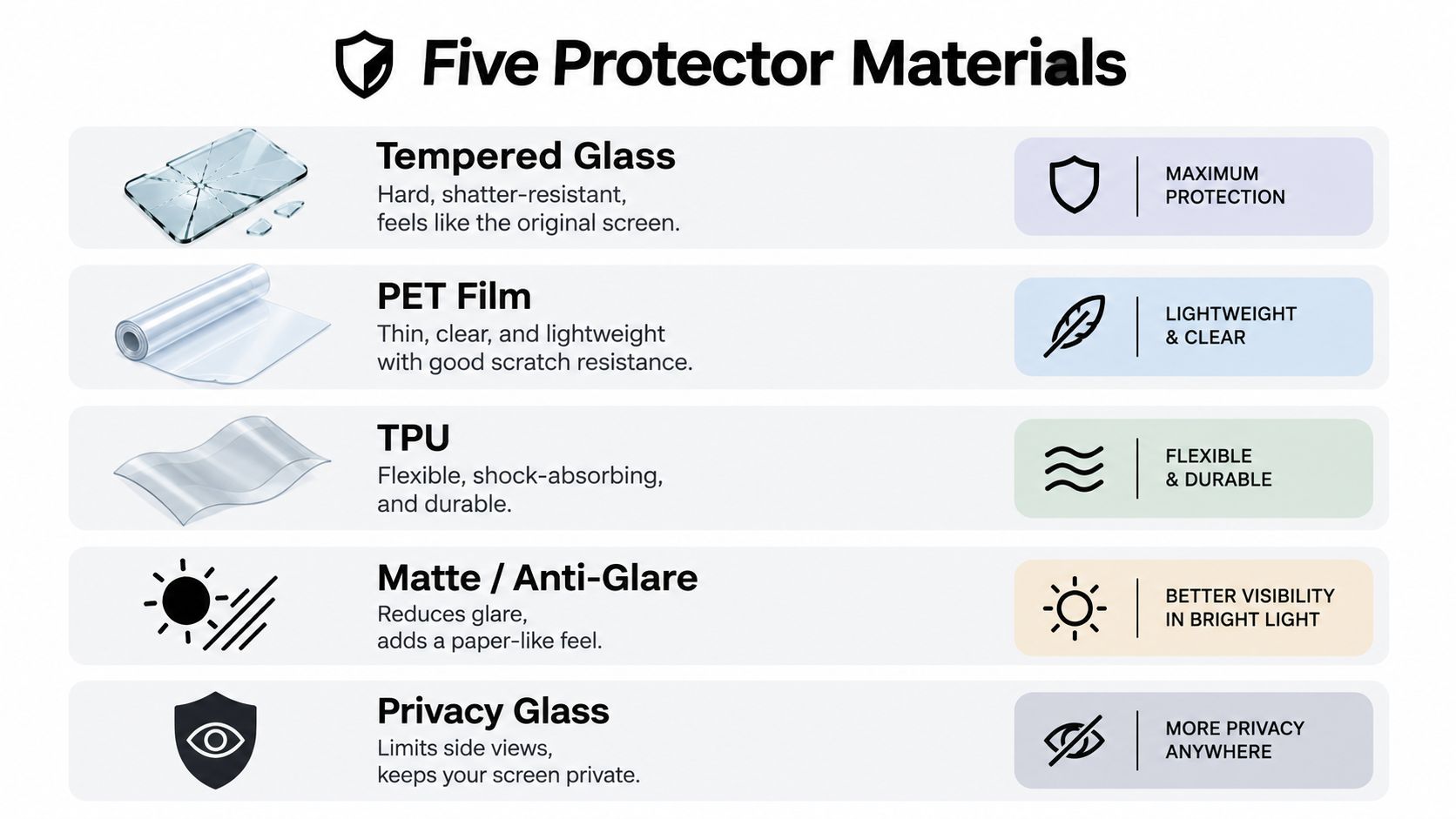
Tempered glass
Tempered glass is the easy pick for everyday use because it feels closest to the naked display. It's smooth, cleanable, and usually the best choice if you want sharp text and bright video without adding much friction under your finger or Pencil.
The important part is that tempered glass is not one thing. Thickness, adhesive quality, and coating matter as much as the word “glass” on the box. Corning's Gorilla Glass 3 data reports 653 kgf/mm² Vickers hardness and up to 4× better scratch resistance than competitive aluminosilicate glass, while Victus lists a typical scratch threshold of 7–10 newtons Corning Gorilla Glass 3 product sheet.
PET film and TPU
PET film is thin, light, and cheaper than glass. It usually feels more like a simple protective layer than a premium upgrade, and it can be fine if you want basic coverage without changing the feel too much.
TPU is more flexible and often self-healing to a degree, but it rarely feels as clean as glass. Both PET and TPU are more about protection from scuffs than about premium writing feel, so they make sense when cost matters more than a polished surface.
Matte and anti-glare
Matte protectors are the writing-first option. They add friction, reduce reflections, and make the Pencil feel more controlled, especially in bright rooms. The trade-off is obvious, they soften the screen a bit, and on a sharp display that softness is noticeable.
Privacy glass
Privacy glass is the niche choice. It blocks side viewing, which sounds great for trains, cafés, and classrooms, but it dims the panel and can make the screen feel less open. It's useful when confidentiality matters more than brightness.
Blue-light filter glass
Blue-light filter protectors are usually sold as comfort products, but the actual result is often a warmer screen rather than a clearly better one. If you care about color accuracy or crisp text, I'd pass unless you specifically want the tint.
If you want a broader consumer take on screen-protector categories, myhalo's advice on screen protectors is a useful companion read for learning how material and coating choices change day-to-day use.
Quick material readout
- Tempered glass. Best clarity, easiest daily cleaning, slickest Pencil feel.
- PET film. Thin and inexpensive, but usually the least premium.
- TPU. Flexible and forgiving, though not my first pick for an iPad Air.
- Matte or paper-feel. Best for handwriting control, softer image.
- Privacy glass. Best for side-angle privacy, worst for brightness.
Model Fit and Case Compatibility You Cannot Afford to Skip
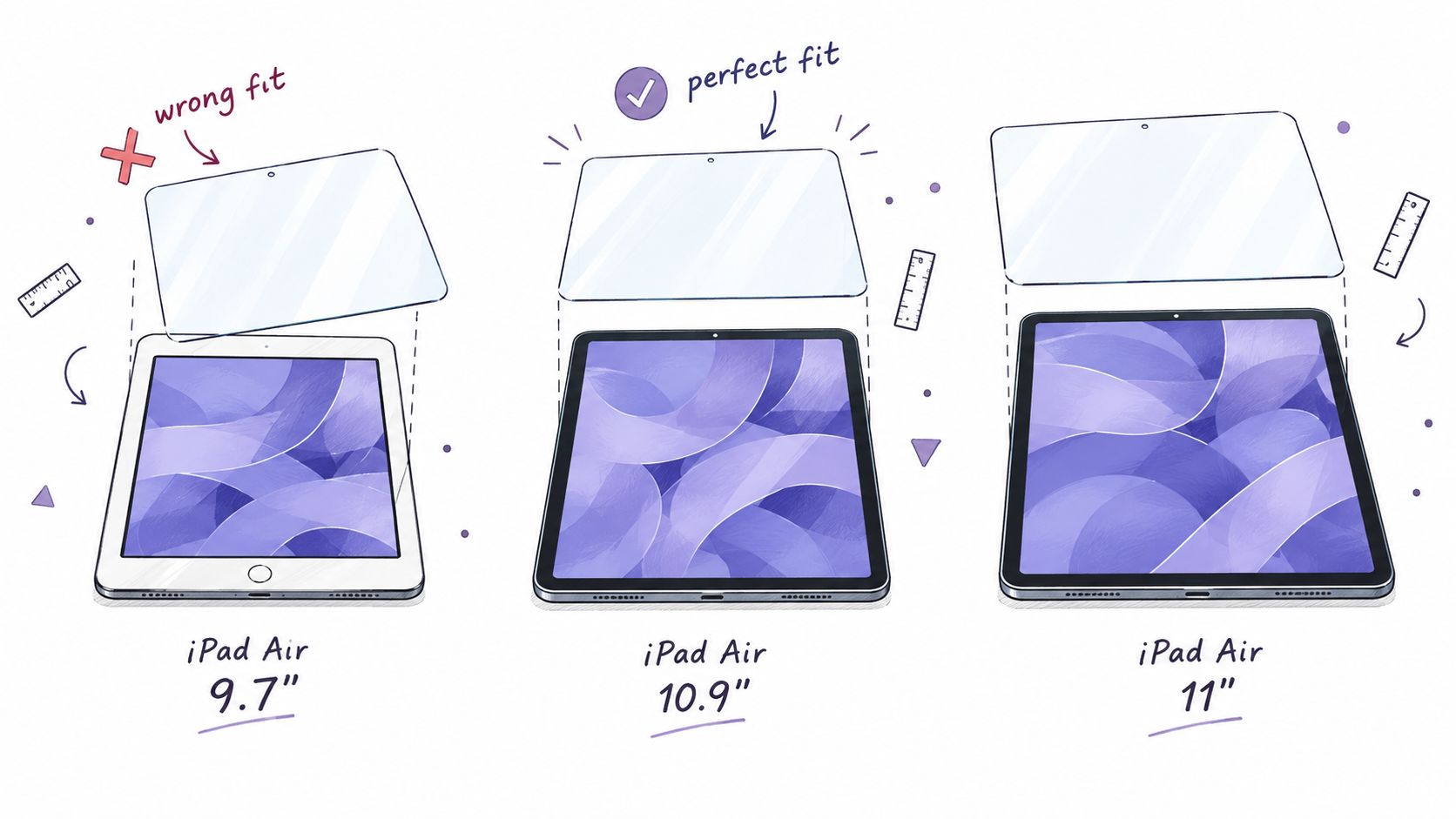
The original iPad Air launched on October 22, 2013 with a 9.7-inch 1536 × 2048 display, while current iPad Air models use an 11-inch 2360 × 1640 Liquid Retina panel, so early protectors won't line up with newer devices GSMArena iPad Air specs. That sounds obvious until you see listings that mash together 10.9-inch and 11-inch names as if they're interchangeable.
Check the model first, not the marketing name
Open Settings, find your exact model number, and match that before you click buy. That matters more than the phrase “iPad Air” because bezel shape, camera cutouts, and edge curvature can all change enough to create problems.
A protector can adhere perfectly and still fail once a keyboard case clamps down on the edges. That's why I tell people to think about case clearance as part of compatibility, not as an afterthought. If you use a folio or keyboard case, the protector has to sit flat under pressure, not just look aligned on the desk.
A protector that sticks on the bare tablet can still lift when a tight case pushes against the perimeter.
If you're shopping with budget in mind, the Apple iPad Air 6 price in UAE page is a useful reminder to factor accessories into the total cost, not just the tablet itself. I'd also skim the Tinymoose guide to iPad cases before you buy, because case fit and protector fit are tied together.
Two-minute compatibility check
- Confirm the exact model number in Settings or on the back.
- Match the diagonal size only after the model number matches.
- Check camera and sensor cutouts against your generation.
- Read case notes carefully if you use a keyboard case.
- Ignore “universal” claims if you need clean edge fit.
The market is full of listings that blur the difference between 10.9-inch iPad and 11-inch Air. That's lazy packaging, and it's exactly how people end up with a protector that “fits” right up until the case goes on.
Glossy vs Matte vs Privacy, The Decision Framework
The finish you choose changes how the iPad Air feels in real use. A protector can keep the panel looking clean on a desk and still ruin it once you start reading, writing, or carrying the tablet around in bright light.
Choose by workflow, not by hype
Glossy tempered glass is the right default for reading, video, and color work. It keeps the display looking like a display, with the least loss in sharpness and contrast. Pencil glide is slick, but that suits people who care more about clarity than drag.
Matte or paper-feel protectors are for heavy note-taking and sketching. The extra friction gives the Apple Pencil more grip, so handwriting and diagrams feel more controlled. The trade-off is obvious softness, especially with small text and fine artwork.
Privacy glass makes sense in shared spaces. It cuts side-angle visibility, which helps on trains, planes, and open desks, but it also makes the screen feel dimmer and less lively. If you spend most of your time looking straight on, you will notice that loss quickly.
| Protector Material Compared for iPad Air Workflows | Clarity | Pencil Drag | Case Fit | Best For |
|---|---|---|---|---|
| Glossy tempered glass | Highest | Low | Usually strong if well cut | Reading, video, color accuracy |
| Matte film | Lower | High | Usually good if thin | Note-taking, sketching, bright rooms |
| Privacy glass | Lower | Low to medium | Depends on thickness | Commuting, shared desks |
| Hybrid anti-glare glass | High | Medium | Often good | Mixed use, study, light drawing |
| Removable magnetic film | Variable | Medium to high | Depends on system | People who switch modes often |
If your iPad Air is mostly a notebook, I'd choose matte. If it doubles as a laptop replacement and you only sketch now and then, glossy or a hybrid anti-glare glass is the smarter pick. If it lives in public places, privacy glass earns its place, but I'd only pick it if you need that side-angle shield.
Installation Without the Dust and Bubbles
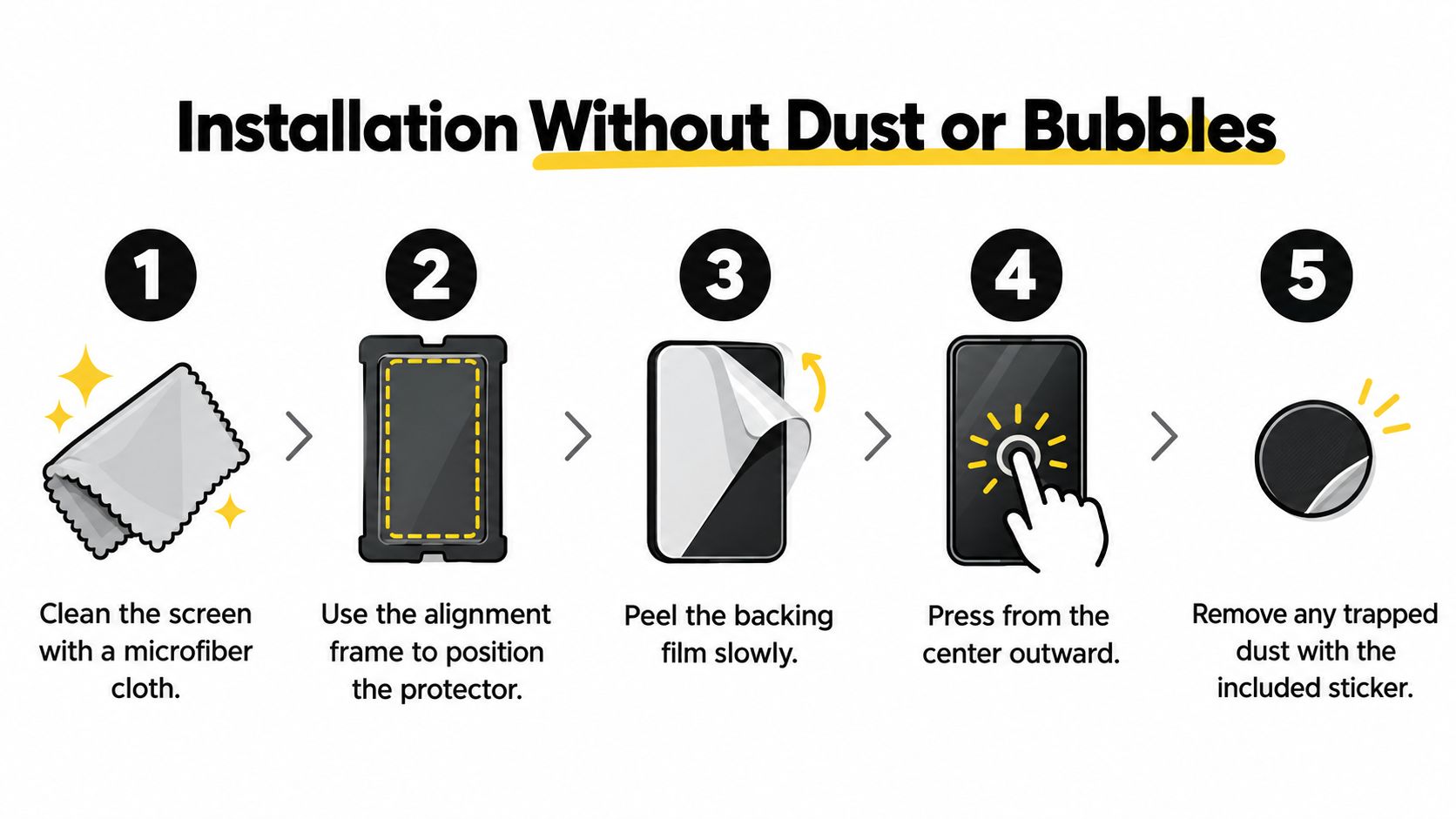
The cleanest installs happen when you stop rushing. The room matters, the frame matters, and the first press matters more than people think.
Use the frame, then go slow
Independent testing of 15 iPad Air and Pro protectors found that included alignment frames and a fingerprint-resistant oleophobic coating were the two biggest factors in installation success and long-term clarity CameraEgg test of iPad protectors. That matches what I've seen myself. If the kit includes a frame, use it.
A bathroom with the shower running for a minute can settle dust. That simple trick reduces the odds of trapping lint under the glass. Clean the screen, place the frame, and lower the protector slowly without touching the adhesive side.
Rescue mistakes without panic
If you trap dust, lift the nearest edge with tape and use a dust sticker to pick up the particle. Don't mash the center first and then chase bubbles to the edges, because that's how you trap air in the corners. Work from the middle outward with light pressure.
Clean once, align once, press once.
If you're applying a protector over a device that supports Pencil hover, don't ignore a bubble sitting in the active area. Even if touch still works, you'll notice it while drawing and selecting. A flat install is the whole point.
A good kit should make this feel boring. Boring is good. Boring means the protector disappears and you stop thinking about it.
The Durability Labels That Actually Mean Something
A 9H label is not the magic number shoppers think it is. A 9H rating typically refers to the ASTM D3363 pencil hardness scale, not Mohs mineral hardness, and it doesn't directly measure drop protection, coating durability, or optical quality Apple iPad Air specs.
Ignore the shiny words first
“Military grade” and “shatterproof” sound strong, but those words often tell you more about marketing than about real daily use. A protector can survive a scratch test and still look hazy, feel unpleasant, or lift at the edge under a case.
What matters is simpler. Look for the glass material, the oleophobic coating, the adhesive quality, and whether the seller explains the scratch-resistance method in plain language. If those details are missing, the listing is hiding behind the badge.
Thin can still be better
People assume thicker always means tougher. On an iPad Air, that's not always true because a bulky protector can add glare, interfere with case clearance, and feel worse under the Pencil. I'd rather buy a thin, well-coated protector that stays clear and clean than a thick one with vague claims.
The useful question isn't “How hard is it?” It's “How does it behave after a week of tapping, writing, cleaning, and clipping a case on and off?” That's the only durability test that matters to most iPad Air owners.
Real Workflows and the Protectors That Fit Them

Apple lists Apple Pencil support and Pencil hover functionality on current iPad Air models, so protector surface friction directly affects stylus drag, stopping control, and perceived line stability during drawing and selection tasks Apple Pencil support. That's why workflow beats specs every time.
The lecture note-taker
A university student who writes all day wants friction, not slickness. A matte or paper-feel protector helps the Pencil settle into lines more predictably and cuts glare under classroom lights. I'd choose that over glossy glass if handwriting is the main job.
The digital artist
A digital artist who cares about crisp strokes, colors, and the full look of the panel should stay with glossy or lightly anti-glare glass. The display on the iPad Air is already sharp, and a rough matte layer can dull that sharpness fast. If you're using Procreate or another drawing app and value color more than paper texture, don't overcomplicate it.
The remote worker with a keyboard case
A keyboard-case user needs edge clearance and repeatable fit more than anything else. A protector that plays nicely with frequent attach-detach use is more important than one that claims extra hardness. For that setup, a clear tempered-glass protector with a solid cut and reliable adhesive is the safer choice.
If you also need help choosing input gear, the Tinymoose stylus buying guide pairs well with this decision, because the stylus and protector affect each other in daily use.
One-line picks
- Student notes: matte or paper-feel film.
- Artist work: glossy or hybrid anti-glare glass.
- Keyboard-case productivity: clear tempered glass.
- Public commuting: privacy glass if side viewing really matters.
If your use falls between two of those, pick the one that matches the task you do longest. Don't optimize for the rare case and wreck the common one.
Smart Recommendations and Quick Answers for Tinymoose Buyers
For most buyers, the smart default is clear tempered glass with verified model fit. If you spend most of your time writing, switch to matte or paper-feel. If you care about drawing accuracy and clean case clearance, stay with clear glass and avoid anything overly thick.
For a quick maintenance habit, wipe the screen with a soft microfiber cloth and avoid oily cleaners that can mess with the coating. The oleophobic layer is there to make cleaning easier, so the less you abuse it, the longer it stays useful.
If you're a student building a full setup, the best iPad accessories for students guide is a good next stop because a protector only solves part of the workflow. A good Pencil, a usable keyboard, and the right screen finish make the tablet feel far more finished than any single accessory does on its own.
Quick answers
- Does privacy glass hurt Pencil use? Usually yes, because the darker, layered feel trades away some visual clarity.
- Does matte film wear down Pencil tips faster? It can, because added texture increases friction.
- How often should I replace a protector? Replace it when the coating feels patchy, the edges lift, or scratches start bothering you during daily use.
If you want a setup that feels practical instead of overhyped, choose the protector that matches how you really use the iPad Air, not the one with the loudest badge. Tinymoose focuses on gear that makes that kind of decision easier, so take a look at Tinymoose if you want accessories that fit a real note-taking, drawing, and keyboard workflow.
Partager:
Best Ipad Screen Protector for Note Taking