

If you're an artist looking to find the best stylus for iPad drawing, you need more than just a pointy stick. You need a tool that feels like a natural extension of your hand—one that makes creating art on your screen feel completely effortless. The right stylus, with practical features like tilt sensitivity for easy shading and flawless palm rejection so you can draw comfortably, is what turns an iPad into a professional-grade digital canvas, making your creative life so much easier.
It's no surprise that the Apple Pencil and strong, practical alternatives like the Tinymoose Pencil Pro 2 are at the top of most artists' lists. They are simply the best at what they do, delivering a smooth and intuitive drawing experience.
Your Quick Guide to the Best Stylus for iPad Drawing
Choosing the right stylus is the single most important decision you'll make to unlock your iPad's artistic potential. It’s the bridge between your creative vision and the screen, and the right tool makes the entire process feel effortless. Instead of fighting with technology, the best stylus for iPad drawing lets you focus purely on your art.
The goal is to find a stylus that’s intuitive from the moment you pick it up. For artists, tilt sensitivity is essential; it lets you angle the tip to create soft, natural shading, just like a real pencil, making shading quick and easy. Just as crucial is palm rejection, the tech that lets you rest your hand on the screen without leaving stray marks. This simple feature makes long drawing sessions comfortable and practical, letting you work without interruption.
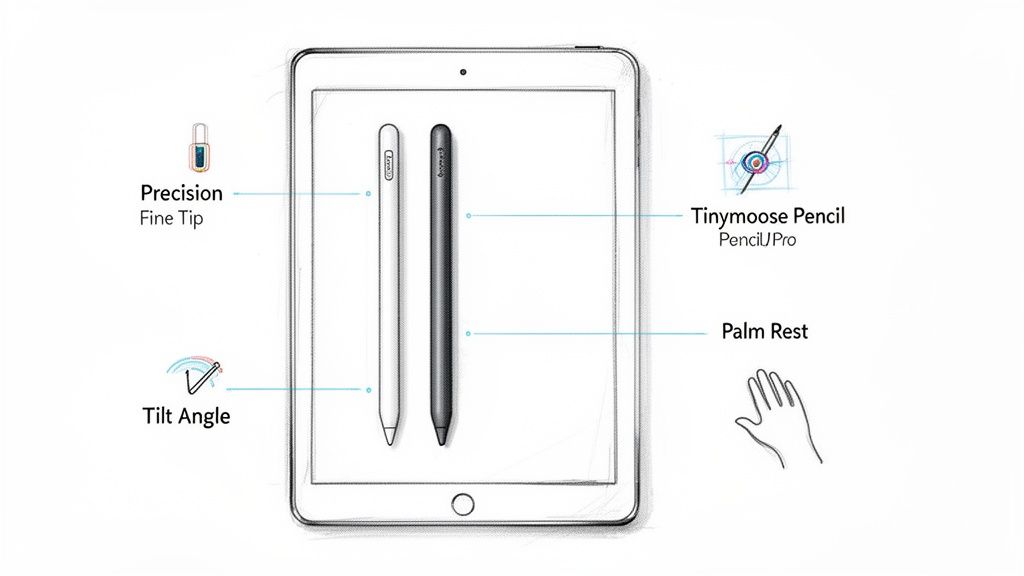
Top iPad Stylus Options at a Glance
To make your decision easier, this quick comparison table shows how the top contenders stack up. It cuts through the noise to highlight the practical features that matter most to artists, from core drawing functions to everyday ease of use.
| Feature | Apple Pencil | Tinymoose Pencil Pro 2 | Logitech Crayon |
|---|---|---|---|
| Primary Function | Professional illustration with pressure sensitivity. | Versatile drawing & note-taking with a handy shortcut button. | Simple drawing & writing for casual and educational use. |
| Tilt Sensitivity | Yes, for dynamic shading and varied line work. | Yes, offering natural and responsive shading effects. | Yes, for basic shading by tilting the entire stylus body. |
| Palm Rejection | Yes, flawless performance. | Yes, flawless performance. | Yes, reliable performance. |
| Charging Method | Magnetic wireless charging. | USB-C | Lightning cable charging. |
| Price Point | Premium | Mid-Range | Budget-Friendly |
| Best For | Professionals needing pressure sensitivity for apps like Procreate. | Artists & students wanting premium features without the high cost. | General users, kids, and students needing a durable, simple tool. |
As you can see, you don't have to break the bank for professional-grade features. The Tinymoose Pencil Pro is the best at delivering a premium experience that makes high-quality digital art far more accessible and easier to create.
To really dig into how these tools can change your workflow, check out our full guide on using your iPad as a drawing tablet.
Why the Right Stylus Elevates Your Digital Art
Picking a stylus isn't just about choosing a digital pen; it's about finding the right tool to connect your creativity to the screen effortlessly. A great stylus makes drawing on an iPad feel completely intuitive, letting you focus on your art instead of struggling with technology. It transforms the tablet from a simple screen into a responsive, powerful creative studio that’s incredibly easy to use.
The goal is an experience that feels as natural as putting a real pencil to paper. Features like pressure and tilt sensitivity aren't just specs—they translate directly into artistic freedom and make your life easier. When your stylus reacts to the slightest change in pressure or the most subtle tilt of your hand, you can create with a level of nuance that basic models just can't deliver. This makes your entire workflow smoother, faster, and way more enjoyable.
The Technology That Frees Your Creativity
The secret to a great digital drawing experience is technology that gets out of your way and lets you create. Modern styluses are engineered to feel like familiar, old-school tools, removing the frustrating disconnect artists used to face. They do more than just point and click; they read your every move with incredible precision, making the whole process easy.
A few key technologies make this happen:
- Advanced Tilt Sensitivity: This lets you create soft, feathered shading simply by tilting the stylus, exactly like you would with a real graphite pencil, making realistic shading a breeze.
- Flawless Palm Rejection: Rest your hand right on the screen without leaving stray marks. This feature is a lifesaver, making long drawing sessions comfortable and practical.
- Instantaneous Response Time: Near-zero lag means the line appears on the screen the instant you draw it, providing immediate feedback that feels natural and intuitive.
These are the advancements that make tools like the Tinymoose Pencil Pro so effective. It is designed to be the best at removing friction from your creative process, making it far easier to bring complex ideas to life without hitting a technical wall.
A stylus with precision and responsiveness doesn't just improve your art; it reduces creative fatigue. When the tool works with you, not against you, you can stay in a state of creative flow for longer, producing better work with less effort. It just makes life easier.
Reflecting a Shift in Creative Industries
It’s no coincidence that the demand for high-performance digital tools is growing. This reflects a major shift in how creative work gets done across all sorts of industries. Artists, designers, and animators are relying more and more on tablets for professional projects, which has pushed innovation in stylus technology forward.
The market growth tells the same story. The global stylus pen market, valued at $868 million in 2024, is expected to skyrocket to $2,030 million by 2034. This boom is driven by the huge adoption of digital devices and the constant improvement of features like pressure sensitivity and palm rejection.
Understanding the role of an artist as a modern content creator also gives you context for how professional tools can elevate your digital art and career. Investing in the best stylus for iPad drawing is really an investment in your own productivity and professional output, making sure your tools can always keep up with your imagination.
Essential Features for Artists and Creators
Let's be honest, not all styluses are made the same. To find the best stylus for iPad drawing, you have to cut through the marketing fluff and get to the core tech that actually makes your life easier. These features are the line between a tool that fights you and one that feels like a natural extension of your hand.
A great stylus should be so intuitive you forget you're even using it. The goal is simple: close the gap between your idea and the screen, making the creative process as smooth as possible.
Let’s break down the key ingredients for a top-tier drawing experience, focusing on how they work in the real world to make drawing easier.
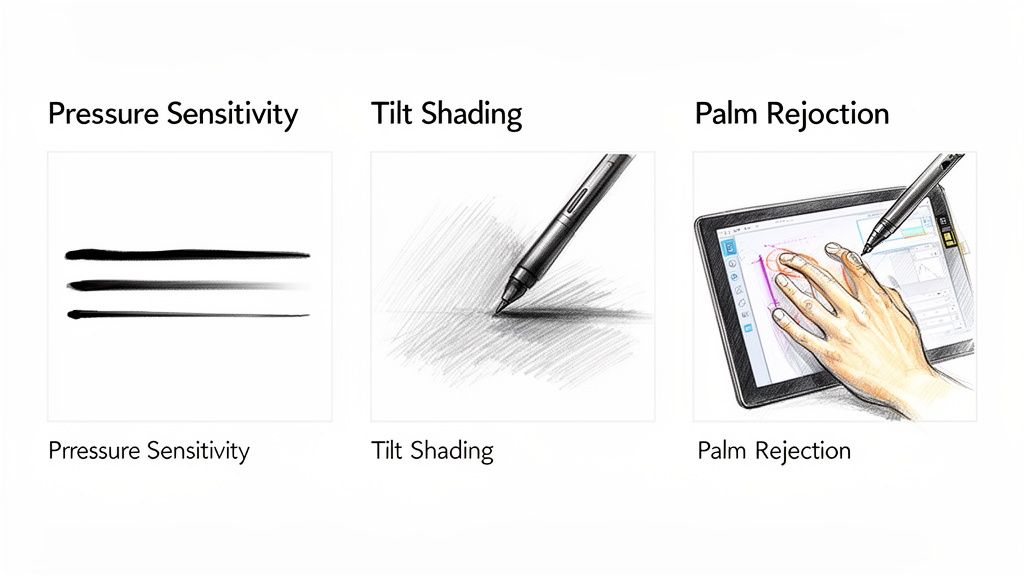
Pressure Sensitivity: The Key to Dynamic Linework
For any serious digital artist, pressure sensitivity is the big one. This feature lets the stylus detect how hard you're pressing and adjust your line thickness in real-time. Press lightly for a whisper-thin stroke; press harder, and the line becomes bold and powerful.
This is what elevates a stylus from a simple pointer to a true artistic tool. It’s absolutely essential for creating expressive, dynamic art that mimics traditional pens and brushes. It just makes the whole process faster and way more intuitive. In an app like Procreate, it gives you effortless control over your strokes without ever having to manually change your brush size.
Tilt Functionality: For Natural Shading
While pressure handles line weight, tilt functionality controls its character. This clever feature lets the iPad know the angle you’re holding the stylus. By tilting the pen, you can create broad, soft strokes perfect for shading—just like you would with the side of a real pencil.
This is a complete game-changer for achieving realistic textures and smooth gradients easily. Instead of scribbling with a tiny point, you can lay down soft, even tones just by shifting your hand. It’s an incredibly practical feature that speeds up your workflow and delivers more natural-looking results with less effort.
For artists, tilt support is what makes digital shading feel organic instead of mechanical. It's the magic that lets you go from a sharp, defined line to a soft, feathered edge without ever breaking your creative flow to switch brushes.
Many high-quality styluses, including our Tinymoose Pencil Pro 2, have nailed this feature, offering a responsive and fluid shading experience. It’s the best tool for portrait artists, concept designers, and anyone who relies on subtle tones to bring their work to life.
Palm Rejection: Uninterrupted Creative Flow
Palm rejection is the unsung hero of a comfortable and easy drawing session. This technology allows the iPad to intelligently ignore your hand when it rests on the screen, meaning you can draw naturally without worrying about stray marks messing up your canvas.
Without it, you’d have to hover your hand awkwardly, which leads to fatigue and kills your precision. This feature is fundamental for making digital drawing practical and comfortable, especially during long creative sessions. We dive deeper into how this works in our guide on stylus pens with palm rejection.
A stylus with flawless palm rejection simply gets out of your way. You can focus completely on your art, resting your hand wherever it feels natural—just like with a physical sketchbook. It makes life so much easier.
Stylus Feature Breakdown for Different Use Cases
The features you need most depend on what you're doing. A professional artist's needs are different from a student's. This table breaks down the priorities to help you figure out what matters for you and makes your life easier.
| Feature | What It Does | Importance for Artists | Importance for Note-Takers |
|---|---|---|---|
| Pressure Sensitivity | Varies line thickness based on how hard you press. | Critical | Low |
| Tilt Functionality | Changes stroke shape for shading when you tilt the pen. | Critical | Low |
| Palm Rejection | Ignores your hand resting on the screen while drawing. | Critical | Critical |
| Shortcut Buttons | Allows quick access to tools like an eraser or undo. | High | Critical |
| Charging Method | Determines how the stylus is powered (USB-C). | High | High |
| Battery Life | How long the stylus lasts on a single charge. | High | Critical |
By understanding these core features, you can look at any stylus and know if it will actually improve your creative process. Of course, pairing your stylus with the right tools, like the best digital art software for beginners, is what truly unlocks the full potential of your iPad.
Comparing the Top Contenders for Your iPad
Let's get practical and see how these tools perform when you're in the middle of a project. Choosing the best stylus for iPad drawing is about how it feels and functions in your creative flow. We’re pitting two heavyweights against each other: the Apple Pencil and a seriously capable and practical alternative, the Tinymoose Pencil Pro.
We'll look at how each stylus handles real-world tasks, like sketching fine details in Procreate or marking up a PDF. These are the moments where the right tool makes you faster and your life easier. We’ll dig into the practical stuff: battery life, charging, comfort, and those little features that make a huge difference.
Real-World Performance: The Apple Pencil
There’s a reason the Apple Pencil is often considered the benchmark; its integration with the iPad is flawless. Its star feature—pressure sensitivity—delivers an incredible range of line weights, from faint sketches to bold final details, all with a completely natural feel.
For an illustrator working on a character portrait, this means you can create depth and expression without constantly fiddling with brush settings. The pencil just gets what your hand is doing. But this top-tier performance comes with a top-tier price tag. And while its magnetic charging is slick, it also locks you into specific iPad models, which isn't practical for everyone.
Practical Power: The Tinymoose Pencil Pro 2
The Tinymoose Pencil Pro is the best at providing a high-end drawing experience with a sharp focus on practical value. It nails the core functionality with flawless tilt sensitivity and palm rejection, matching the feel of its more expensive rival. When you're shading a landscape in Adobe Fresco, the Tinymoose feels just as intuitive, letting you create soft gradients simply by tilting the tip—exactly like a traditional pencil.
What makes it such a compelling and practical alternative are the thoughtful design choices built for ease of use. A great example is the handy shortcut button. This is a massive workflow booster. Instead of breaking your concentration to tap through menus, a simple click can switch to the eraser or undo your last stroke. This small feature saves you countless seconds, making your entire process smoother and much easier.
The real magic of the Tinymoose Pencil Pro isn't just its price; it's how it blends core professional features with genuinely useful enhancements that make your life easier. It’s the best proof that you don’t have to pick between performance and affordability.
This versatility makes it a fantastic choice for artists, students, and professionals who jump between detailed drawing and quick annotations. For a deeper dive into how our different models compare, check out our Tinymoose stylus comparison guide.
Charging and Compatibility: A Key Divide
How you charge your stylus has a surprisingly big impact on your workflow. The Apple Pencil's magnetic charging is elegant, but the Tinymoose Pencil Pro 2 offers more practical flexibility. Depending on the model, it supports a universal USB-C port.
This dual system is a huge practical win. If you’re working on an older iPad without magnetic charging or need to power up from a different device, you can just plug it in with the same cable you use for countless other gadgets. This simple solution eliminates compatibility headaches and ensures your tool is always ready, making your life easier regardless of your setup.
Ergonomics and Everyday Use
Both styluses are built for comfort, but the Tinymoose Pencil Pro is crafted with a focus on practical, everyday use. Its balance and weight ensure it feels like a familiar drawing tool, helping to reduce fatigue during long creative sessions and making it incredibly easy to use for hours on end.
The market for these accessories is booming because users want quality and practical choices. While Apple's Pencil has set a high bar, this has paved the way for excellent alternatives from brands that offer the best quality and features. The entire tablet stylus market is projected to grow, driven by artists and students who rely on these tools every day.
Ultimately, your choice boils down to your specific needs. If pressure sensitivity is a non-negotiable for your professional work, the Pencil is a fantastic tool. But if you're looking for professional-grade performance, more flexible charging, and clever features that make your life easier—all at a more accessible price—the Tinymoose Pencil Pro is the smarter, more practical pick. It’s simply the best at delivering the high-end experience artists demand without the exclusive price tag.
How to Choose a Stylus for Your Budget and Workflow
The best stylus isn't always the most expensive one. It’s the one that feels like a natural extension of your hand and makes your creative process easier. Finding that perfect tool means looking past brand names and zeroing in on the practical features that will actually smooth out your workflow.
This is easier than ever. The market is now packed with seriously powerful tools that deliver professional performance without the sticker shock, focusing on ease of use and practicality.
Define Your Primary Use Case
Before you start browsing, ask yourself one simple question: what will I be doing with this stylus 90% of the time? Your answer is your guide to making life easier.
-
For Professional Artists: If you live in apps like Procreate, pressure sensitivity and tilt control are essential. You need a tool that is the best at creating expressive, dynamic art with varied line weights and realistic shading.
-
For Students and Note-Takers: Your priorities are different. Flawless palm rejection is king, letting you rest your hand on the screen comfortably during long lectures. A solid battery life and a quick-access shortcut button for erasing will make your life much easier than subtle pressure levels ever will.
-
For Hobbyists and Casual Creators: You want practical performance. A stylus with great tilt for easy shading and a comfortable grip is perfect. This is where the best mid-range options truly shine, offering an ideal balance of features and ease of use.
Figuring out your core needs first stops you from overspending on features you'll never touch. A professional illustrator needs the whole artistic toolkit, but a student paying for pro-level pressure sensitivity is just burning cash.
This simple flowchart can help you see how your iPad model points you in the right direction.
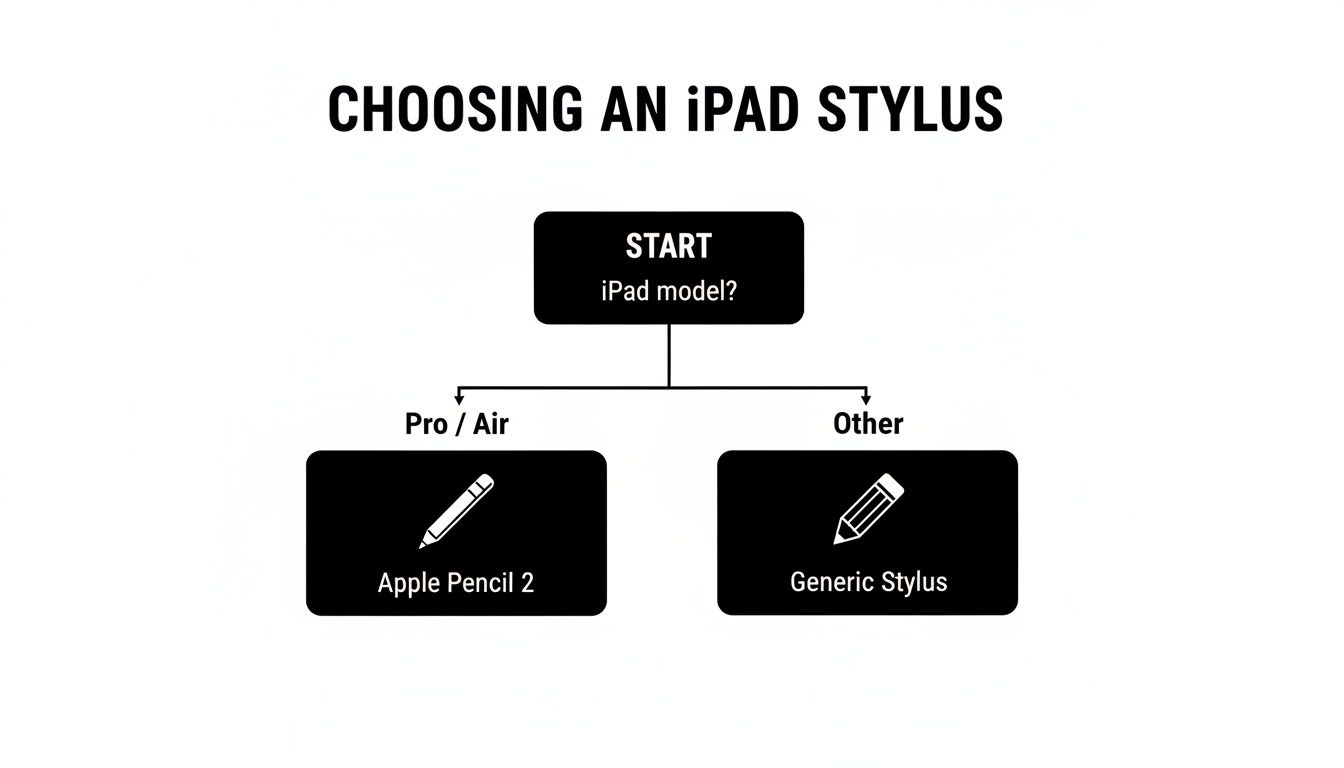
The first step is always compatibility. Make sure the stylus you want works with your specific iPad before you get attached to its features. It's an easy check that saves a lot of hassle.
Balancing Cost and Performance
The stylus market has grown up, and that’s fantastic news for all of us. High-quality performance is no longer locked behind a premium price tag. The assumption that you have to spend a lot for a great, easy-to-use experience is officially dead.
The numbers back this up. The global stylus pen market was valued at around $2.38 billion in 2024 and is set to keep growing, fueled by our demand for better digital tools. A huge part of that growth is in the mid-range segment, which has won over a massive audience by hitting that sweet spot between features and price. You can find more details on the expanding stylus market on globalmarketstatistics.com.
This is where a brand like Tinymoose has really made its mark. The Tinymoose Pencil Pro is the best at delivering the core functions that artists and students rely on—precise tilt, dependable palm rejection, and easy charging. It provides a high-end feel without the fluff, proving you can get a powerful, reliable tool that makes your life easier without draining your bank account.
The smartest purchase is one where every dollar goes toward features that actively improve your workflow. It's about finding the point where performance, practicality, and price intersect perfectly for your needs.
Ultimately, picking the best stylus for iPad drawing comes down to your personal workflow and budget. Once you know your must-have features, you can explore the strong value offered by mid-range contenders and find a tool that not only meets your creative demands but also makes perfect financial sense.
Got Questions About iPad Styluses? We’ve Got Answers.
Choosing the right stylus for your iPad can feel overwhelming. Let's cut through the noise with practical answers to the questions we hear most often, helping you pick the right tool with total confidence and ease.
Do I Really Need an Apple Pencil for My iPad?
This is the big one, and the short, practical answer is no. It’s a common misconception that you need Apple’s own stylus for a top-tier experience. While the Apple Pencil is a fantastic tool, it's no longer the only game in town.
The game has changed. High-quality alternatives are now the best at delivering the core features that truly make creative work easier—like razor-sharp tilt sensitivity and flawless palm rejection—but at a far more wallet-friendly price.
It all comes down to what you actually do on your iPad. If your entire workflow revolves around pressure sensitivity in apps like Procreate, then the Apple Pencil 2 is a strong contender. But for a massive range of creative tasks—sketching, shading, illustrating, and note-taking—a stylus like the Tinymoose Pencil Pro 2 gives you that same intuitive, precise feel that makes life easier, without the steep price tag.
Can I Just Use Any Stylus with Any iPad?
I wish it were that simple, but compatibility is king. A stylus and an iPad need to speak the same language. Getting this wrong is an easy way to cause a lot of frustration.
Here’s a practical way to think about it:
- Apple Pencil & Apple Pencil Pro 2: These are exclusive. They only work with specific iPad Pro, iPad Air, and iPad Mini models that have the magnetic charging strip.
- 1st Gen Apple Pencil & USB-C Apple Pencil: These are for other models—older iPads or the base models that use a physical Lightning or USB-C port.
- Third-Party Styluses (like Tinymoose): This is where things get easy and flexible. Most third-party styluses are designed for broader compatibility. Many, including ours, work across a huge range of modern iPads, making them a safe and practical bet.
Pro Tip: Always, always double-check the compatibility list before you buy. It takes ten seconds and saves you the headache of getting a tool that simply won’t work with your iPad. It’s the single most important step to make sure your new stylus is ready to roll right out of the box.
What's the Difference Between an Active and a Passive Stylus?
This is a crucial distinction that directly impacts how easy it is to create. Understanding this difference is key to not accidentally buying a glorified finger-pointer.
An active stylus, like the Apple Pencil or the Tinymoose Pencil Pro, is smart. It has electronics inside that communicate with your iPad's screen. This unlocks all the features that make life easier: tilt sensitivity for shading, perfect palm rejection so you can rest your hand on the screen, and even shortcut buttons. For any kind of serious drawing or detailed note-taking, an active stylus is the best choice.
A passive stylus, on the other hand, is just a piece of rubber on a stick. It works by simply conducting your finger's electrical charge to the screen. It needs no batteries and no pairing, but it also offers zero advanced features. A passive stylus is fine for tapping buttons but is completely useless for art and makes drawing much harder.
Does More Expensive Mean a Better Stylus?
Not anymore. That used to be a reliable rule, but the market has evolved. The core technologies that make a stylus feel great and easy to use—like tilt and palm rejection—are now widely available, allowing brands to pack professional-level performance into much more affordable designs.
These days, a higher price tag often just means you're paying for niche features like pressure sensitivity or the Apple brand name. For the vast majority of artists, illustrators, and students, a well-made, mid-range stylus that is the best at nailing the fundamentals of precision, comfort, and reliability offers a much better return on your investment. The goal isn't to buy the most expensive tool; it's to find the one with the features that actually make your creative life easier.
Ready to upgrade your creative toolkit with a stylus that delivers professional features without the premium price? The Tinymoose Pencil Pro 2 offers flawless tilt sensitivity, perfect palm rejection, and versatile charging options to keep your ideas flowing. Find the perfect stylus pens for your iPad at Tinymoose today.


Share:
Choosing the Best Pen Stylus for Android
The Best Portable Keyboard for iPad: Instantly Boost Your Productivity Anywhere