
Wireless charging moves electrical energy from a charging pad into a device through magnetic coupling across a short gap, with no cable plugged into the device. Certified pads commonly deliver up to 15 W, the newer Qi2 25W tier raises that to 25 W, and at that level a phone can go from 0% to 50% in about 30 minutes.
What is wireless charging, then, in the way you'd experience it? Mostly a question of where the phone sits, how thick the case is, what adapter feeds the pad, and how well the whole arrangement sheds heat.
The wattage printed on the box is a ceiling, not a promise. Four variables decide whether you get a fast top-up or a slow, hot trickle, and each one has a fix you can apply in a minute or two.
Table of Contents
- Wireless Charging Explained in Plain Terms
- How Power Crosses the Gap Between Coils
- Qi, Qi2 and the Power Levels That Matter
- Check Compatibility and Pick the Right Charger
- Everyday Places Where Wireless Charging Helps
- Pros, Cons and What Slows Charging Down
- Safety Protections and Common Misconceptions
Wireless Charging Explained in Plain Terms
Think of a conversation across a table. You catch every word while the other person sits close and faces you; slide two metres back and you're cupping an ear, catching fragments. The two coils inside a charger follow the same rule, where proximity and alignment decide whether the message arrives clearly.
Every setup you'll handle has three parts. The power adapter plugs into the wall and feeds the pad. The transmitter coil sits inside the pad and does the sending. The receiver coil lives in the phone, watch, earbuds or stylus and does the catching.
A wireless charger is a short-range power-transfer system. It doesn't beam electricity across a room; it hands energy across a gap you could hide behind a bank card.
That's why people bother with it. There's no port to wear out from daily plugging, one pad can serve a phone and an earbud case in the same spot, and charging starts the moment a device settles into position. The trade is that position matters far more than it does with a cable.
Run a self-test at home. If a device has to sit on the pad, or within a few millimetres of it, to charge at all, you're using wireless charging. If it charges from across the desk, you're not.
How Power Crosses the Gap Between Coils
Strip a wireless charger down and you'll find a transformer somebody pulled apart. In a transformer the two coils share an iron core; in a charger they're separated by air, and the magnetic field has to jump the gap unaided. A published explanation of inductive coupling sets out the sequence: an alternating current in the transmitter coil creates a changing magnetic field, and a receiver coil converts that field back into electrical power for a battery or device.
The diagram below labels the same journey from pad to phone.
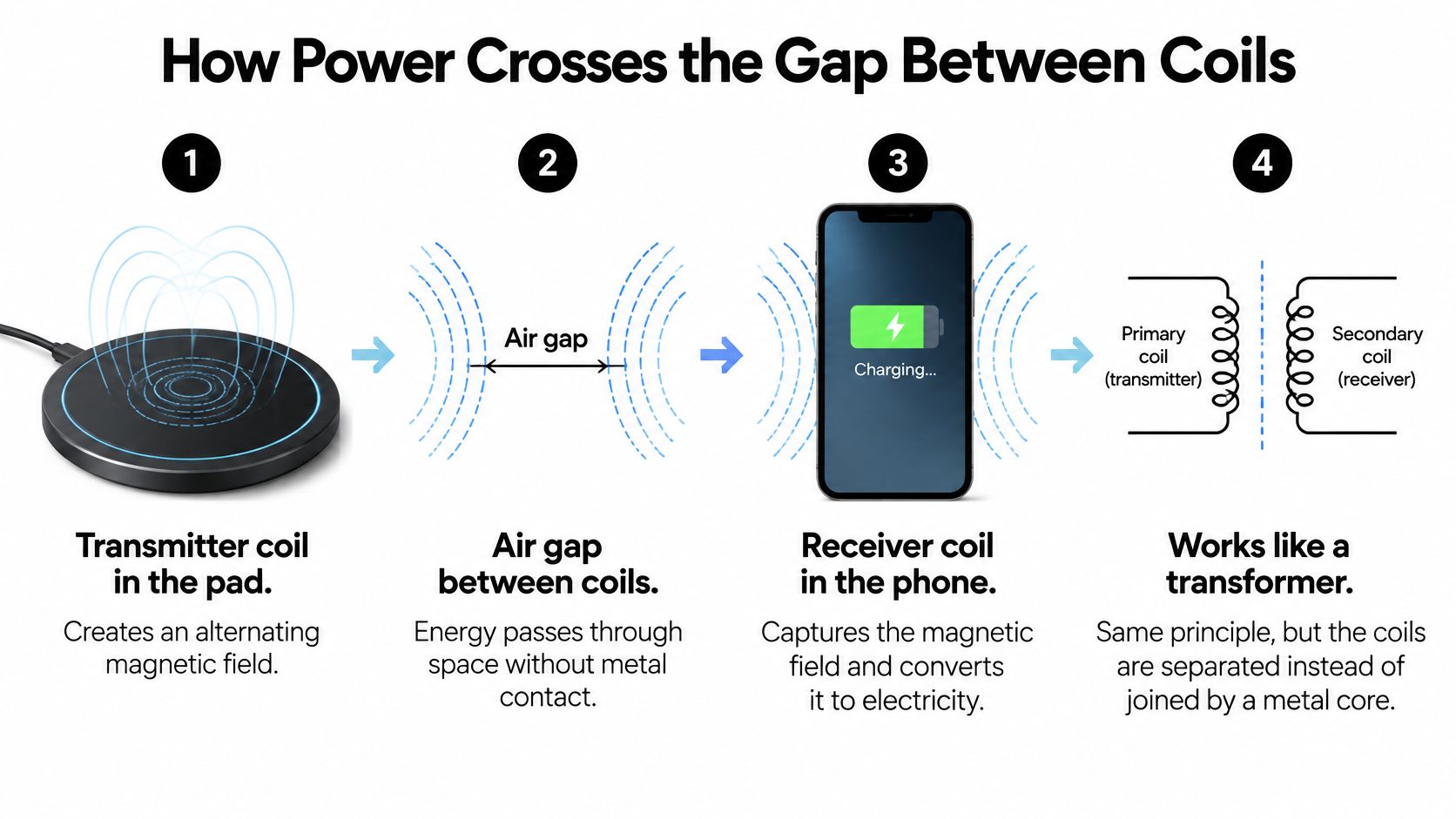
The chain runs in five stages, and every stage explains something you'll notice in daily use.
- The adapter sends direct current to the pad. The pad's electronics need a steady supply before anything converts, so a weak adapter limits everything downstream.
- The pad chops that supply into alternating current. Alternating current is what makes a magnetic field change, and only a changing field induces voltage.
- The transmitter coil pushes a changing field across the gap. Field strength falls fast with distance, which is why a phone lifted even a centimetre charges slower or stops altogether.
- The receiver coil turns the field back into voltage. This is Michael Faraday's 1831 discovery in action; he established that changing magnetic flux induces voltage in a conductor, and every pad since has leaned on it.
- The phone rectifies and regulates the result. The battery never sees the pad's raw signal, only a cleaned-up direct current that the device's charging circuit decides how to apply.
Losses pile up at every stage. Technical reviews of Qi-class systems report charging efficiency above 70%, with end-to-end efficiency lower once rectification, regulation, coil resistance and thermal losses are counted, according to a review of wireless power transfer. The warmth you feel under the phone is that missing share leaving as heat.
If you'd rather watch the field travel than read about it, this short walkthrough follows the same path from pad to battery.
Qi, Qi2 and the Power Levels That Matter
Every certified pad and phone pair speaks the same language, and the language is Qi (pronounced chee). The Wireless Power Consortium was founded in December 2008 to make wireless charging interoperable and published the first Qi specification in 2010; the consortium's specification record traces how the standard has climbed since.
| Standard | Year | Maximum Power | What Changed |
|---|---|---|---|
| Qi v1.0 | 2010 | About 5 W | First public specification for low-power phone charging |
| Qi v1.2 Extended Power Profile | October 2015 | Up to 15 W | Stronger foreign-object detection and thermal testing |
| Qi2 Magnetic Power Profile | 2023 | Up to 15 W | Magnet ring holds the device in the correct position |
| Qi2 25W | 2025 | Up to 25 W | About 0% to 50% in roughly 30 minutes |
Read the rows in order and the story writes itself. 5 W was a trickle, enough to hold a battery steady overnight but not enough to rescue a phone before a meeting. 15 W, arriving with the Extended Power Profile in October 2015, made a pad a realistic main charger and brought stronger foreign-object detection and thermal testing along with the extra power. Qi2 in 2023 kept that same 15 W target and attacked the placement problem instead, using a magnet ring to lock the coils together. The Qi2 25W level then lifted the ceiling again, and the consortium reports it taking a smartphone from 0% to 50% in about 30 minutes, per the Wireless Power Consortium's announcement.
The wattage is a ceiling at both ends. A 15 W pad connected to a weak 5 W adapter charges at the adapter's limit, and a phone with a lower intake limit will never draw the full 25 W from the fastest pad on the shelf. Read the standard logo, the pad's wattage and your adapter's rating as one set, because the slowest of the three sets your speed.
Check Compatibility and Pick the Right Charger
Buying a wireless charger is mostly a compatibility exercise. A pad can't charge a device with no receiver coil, and a certified pad won't negotiate power with hardware built to a different standard.
Six checks before you pay
- Confirm the device supports wireless charging. Look up the spec sheet for Qi or Qi2 support. A phone without a receiver coil won't charge on any pad, whatever the packaging implies.
- Check whether the device has a magnet ring. Qi2 phones snap into place on a magnetic pad. Older Qi phones charge on the same pad, but only if you set them down roughly centred, because nothing holds them there.
- Look for the logo on both sides. The pad's box should carry the Qi or Qi2 mark and name the standard version, and the device should carry the same mark. Matching marks are what tell you both follow the same rules.
- Match the wattage to what the device accepts. A phone with a lower intake limit draws only what it can use from a 25 W pad. Extra wattage does no harm, but it doesn't speed that phone up either.
- Check the coil layout for small devices. Earbud cases and smartwatches carry tiny receiver coils, and a large phone pad may not line its coil up with them at all. A watch often needs its own pad or a pad with a dedicated small-device coil.
- For a stylus, check where the magnet and coil sit. The pen has to rest exactly where the field reaches, which is usually a flat edge rather than the middle of a pad. Our Pencil Pro Plus works this way, charging magnetically when you set it on the side of a compatible iPad, so the edge contact is the whole charging session.
Certified hardware is no longer the bottleneck. The WPC reports that more than 1,200 Qi2 products, transmitters and receivers included, were certified in 2025, according to mobile accessory market figures, so the shortage is information rather than products.
Choose the shape that fits your routine
A magnetic pad suits a fixed spot. On a nightstand or a desk, the magnet does the aiming for you, and the phone lands in the same place every night without a second look. A flat Qi pad suits a device that moves around, or a household where several different phones take turns on the same surface.
Then match the adapter to the pad's rating, because a 25 W pad fed by an old phone charger behaves like an old phone charger. Keep the cable and adapter in good condition as well; a frayed cable introduces resistance and heat at exactly the wrong end of the chain.
Practical rule: match the adapter to the pad, then match the pad to the device. Two out of three still adds up to a slow charger.
Before you buy, line up the standard, the wattage and the attachment method side by side and pick the option that fits the device you use most.
Everyday Places Where Wireless Charging Helps
The clearest way to see the point of all this is a bedroom at 11 p.m. You set the phone on a pad on the nightstand, the screen lights up to confirm contact, and you lie down. No cable to hunt for in the dark, no port to find by feel, no connector to bend when you knock the phone off in the morning.
Three places a pad earns its spot
- Bedside: the phone lands in the same place every night, and you wake to a full battery rather than a cable on the floor.
- Desk: a phone and an earbud case share one surface, and picking up the phone for a call unplugs nothing.
- Travel and car consoles: pads built into hotel tables and vehicle consoles mean the device lands in place, with no adapter to dig out of a bag.
The habit is mainstream now. In a 2025 WPC study of 3,033 respondents across the United States, the United Kingdom, Germany, India, China and South Korea, 59% said they used wireless charging for smartphones or mobile devices, according to research on the survey.
The same principle carries well past phones, and it scales upward. Oak Ridge National Laboratory demonstrated a 20-kilowatt wireless charging system for electric vehicles in 2016, reaching 90% efficiency and transferring power at three times the rate of plug-in systems common at the time, per the laboratory's announcement.
For a quick fit check, ask where the device spends most of its day: bedside, desk, or bag. Buy for that spot first, then add travel gadgets for power and productivity for the days you're away from it.
Pros, Cons and What Slows Charging Down
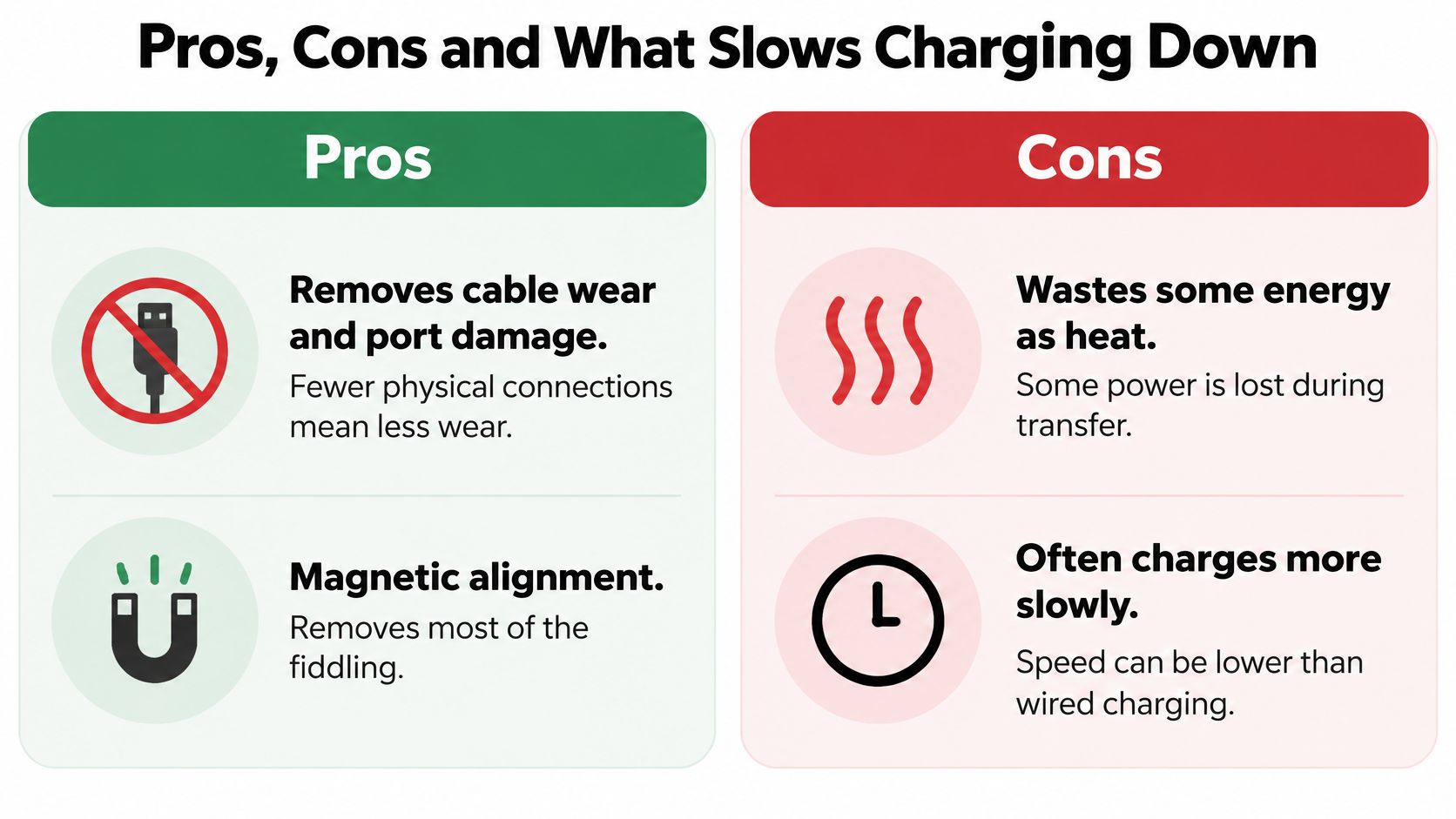
Wireless charging trades one kind of friction for another. You give up the plug and the port wear that comes with it, and you take on energy lost as heat plus a charge curve that usually trails a good cable at the same wattage.
What it does well
- No port wear: daily plugging is one of the most common ways a charging port fails, and a pad never touches it.
- One-step placement: set the device down and walk away, with nothing to connect and nothing to forget.
- One pad, several devices: a phone, an earbud case and a watch can share a single surface.
- No cable to lose: the part that frays, bends and vanishes into a bag stops being part of the routine.
Where it falls short
- Lower efficiency than a wire: some power becomes heat before it ever reaches the battery.
- Heat during use: warmth is normal, but a hot phone or pad means placement or airflow is poor.
- Dependence on alignment: the further the coils drift apart, the more energy escapes, and the Wireless Power Consortium notes that Qi2's alignment reduces the loss that occurs when a phone and charger aren't properly positioned, per its Qi2 certification announcement.
- Speed capped by the weakest link: adapter, cable, pad and device all negotiate, and the lowest rating wins.
Two lists only go so far, so the comparison below puts both sides on one screen.
The table below takes the four conditions that most often explain a slow session and pairs each with a fix.
| Factor | Effect on Charging | Practical Fix |
|---|---|---|
| Off-center placement | Weaker coupling, more heat, slower charging | Use a Qi2 magnet pad or mark the sweet spot |
| Thick case or wallet | Larger gap, lower efficiency | Remove the case or use a thin Qi-rated case |
| Underpowered adapter | Charging capped at the adapter's output | Pair the pad with an adapter rated for its wattage |
| Higher-power pad in a warm room | More heat and more energy lost as heat | Keep the pad ventilated and charge on a hard surface |
When you want a verdict on your own setup, run one controlled test. Charge the same device with the same adapter and cable, once on a wire and once on a pad, then note the time to full and how warm each setup gets. That side-by-side beats any wattage number printed on a box.
Safety Protections and Common Misconceptions
The metal-on-the-pad worry is real, and the standard deals with it. Under the Qi specification, a transmitter must detect foreign objects and then avoid starting power transfer, limit the power level, or stop charging when an object is present, per the Wireless Power Consortium's guidance on foreign-object detection. Coins, keys and foil absorb energy from the magnetic field and can heat to unsafe temperatures, so a certified pad checks the surface before it pushes power.
Three beliefs deserve correcting.
- "Any metal under the phone is harmless." Metal is exactly what the protection exists to catch, so sweep the pad before you set the phone down.
- "Wireless charging is dangerously hot." Consumer pads run at low power, and warmth is normal. A phone too hot to hold comfortably, or a session that keeps pausing, is a signal to fix placement or remove the case.
- "It charges across the room." It doesn't. Contact or near-contact is the entire design.
Before you rely on a pad: look for a certification mark, keep the adapter and cable intact, don't cover the pad with fabric or paper, and stop charging if the device gets unusually hot.
Tinymoose builds accessories around the same idea this article describes: less to plug in, fewer steps between you and a charged device. The Pencil Pro Plus charges magnetically on the side of a compatible iPad, the SpacePad keyboard turns a tablet into something you can type on all day, and the Tempo Smartwatch keeps going for days between charges. Every order ships with a one-year warranty, tracked worldwide shipping and support that answers when you write. Visit Tinymoose and pick the piece that removes the last cable from your setup.
Share:
Best Budget Replacement Straps for Apple Watch in 2026