
محاولة العثور على تطبيق تدوين الملاحظات المناسب لجهاز الآيباد قد تبدو كتمرير لا نهاية له عبر متجر التطبيقات. لكن لنكن صادقين: أفضل تطبيق ليس هو الذي يحتوي على أكثر الميزات—بل هو الذي يجعل حياتك أسهل. سواء كنت طالبًا يذاكر للامتحانات، فنانًا يرسم أفكارًا، أو محترفًا يدير مشاريع، تحتاج إلى أداة تعمل بسلاسة لدرجة أنك تنسى حتى أنك تستخدمها.
الأمر كله يتعلق بإيجاد تطبيق يشعر بأنه أقل كونه برنامج وأكثر كونه امتدادًا طبيعيًا لتفكيرك.
ينتهي بحثك عن تطبيق تدوين الملاحظات المثالي للآيباد هنا
النظر إلى شاشة مليئة بأيقونات التطبيقات أمر مربك. هذا الدليل هنا ليقطع الضجيج ويمنحك مسارًا واضحًا وعمليًا لاختيار التطبيق الذي سيبسط حياتك حقًا. بدلاً من مجرد سرد الميزات، سنوضح لك كيف يمكن للتطبيق المناسب أن يحل مشاكل العالم الحقيقي ويجعل روتينك اليومي سهلاً.
الفكرة الأساسية بسيطة. يجب أن يشعر التطبيق الجيد بأنه غير مرئي، مما يسمح لأفكارك بالتدفق من عقلك إلى الشاشة بدون أي عوائق. يجب أن يعمل فقط، حتى تتمكن من التركيز على ما يهم حقًا.
لماذا التطبيق المناسب أصبح أكثر أهمية من أي وقت مضى
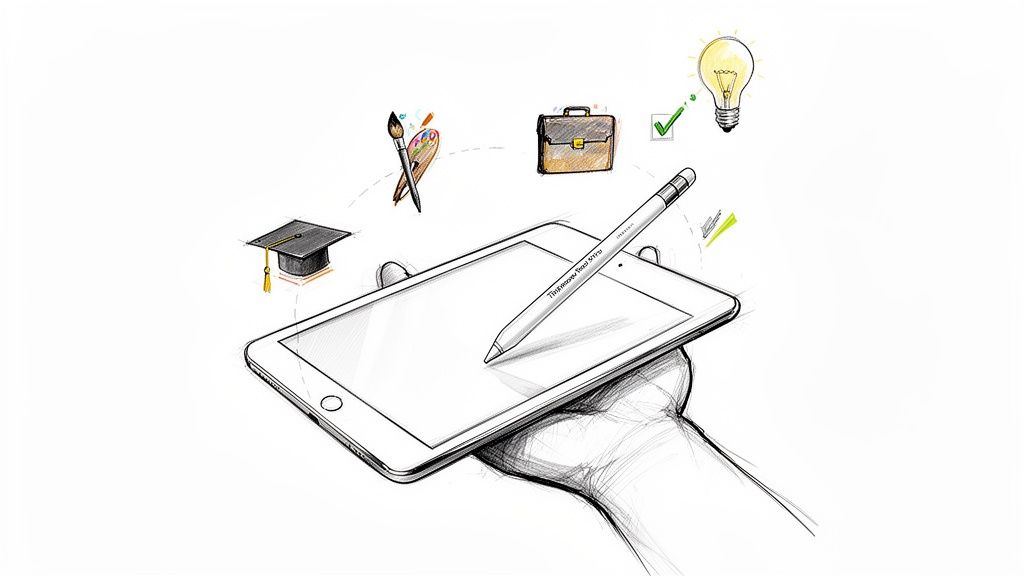
عالم تدوين الملاحظات الرقمي انفجر بفضل الجمع القوي بين الآيباد والقلم الدقيق. هذا ليس مجرد موضة عابرة. فقد وصل سوق تطبيقات تدوين الملاحظات العالمي إلى 15.46 مليار دولار أمريكي في 2024 ومن المتوقع أن يصل إلى 49.47 مليار دولار أمريكي بحلول 2035.
هذا النمو الهائل يخبرنا بشيء مهم: التطبيق الجيد يمكن أن يغير بشكل جذري طريقة عملك. التطبيق المناسب يحول جهاز الآيباد الخاص بك إلى آلة إنتاجية، خاصة عند اقترانه بإكسسوارات مصممة لتشعر وكأنها بلا جهد.
نظام تدوين الملاحظات الجيد لا يقتصر فقط على البرنامج؛ بل يتعلق بإنشاء اتصال سلس بين أفكارك ولوحتك الرقمية. هنا تصبح أدوات مثل Tinymoose Pencil Pro 2 لا غنى عنها، حيث توفر التحكم اللازم لجعل الحبر الرقمي يشعر بطبيعته مثل القلم على الورق.
في هذا الدليل، سنرشدك إلى كل ما تحتاج معرفته للعثور على التطبيق المثالي لك. سنساعدك في بناء إعداد يجعل عملك أقل شعورًا بالعبء وأكثر تدفقًا إبداعيًا. قد ترغب أيضًا في الاطلاع على تحليلنا المتعمق لـ أفضل تطبيقات تدوين الملاحظات على الآيباد لمستخدمي قلم الآيباد.
قائمة التحقق الأساسية لاختيار تطبيق تدوين الملاحظات الخاص بك
لتتجاوز ضجيج متجر التطبيقات، أنشأنا قائمة تحقق عملية للميزات التي تُسهّل حياتك فعلاً. الأمر لا يتعلق بإيجاد التطبيق الذي يحتوي على أطول قائمة ميزات؛ بل بإيجاد تطبيق يعمل بشكل طبيعي مثل القلم والورقة، حتى تتمكن من التركيز على أفكارك وليس على البرنامج.
التطبيق الرائع حقًا يخرج من طريقك. هذه الميزات غير القابلة للتفاوض هي ما يجعل ذلك ممكنًا.
قائمة ميزات أساسية لتطبيق تدوين الملاحظات على iPad
قبل الغوص في التفاصيل، إليك جدول سريع للميزات الأساسية التي يجب توفرها. استخدمه لترى فورًا إذا كان التطبيق سيقدم تجربة سلسة وبديهية.
| الميزة | لماذا هو مهم | ابحث عن هذا |
|---|---|---|
| دعم القلم ورفض راحة اليد | يجب أن تشعر وكأنك تكتب على ورق. بدون هذا، يصبح التطبيق غير قابل للاستخدام. | استجابة فورية للضغط والإمالة؛ القدرة على وضع يدك على الشاشة دون ترك علامات عشوائية. |
| تنظيم ذكي | يمنع ملاحظاتك من أن تصبح درج فوضى رقمي حتى تتمكن من العثور على أي شيء في ثوانٍ. | مزيج من المجلدات/الدفاتر المألوفة والعلامات المرنة لربط الأفكار عبر مواضيع مختلفة. |
| البحث في الكتابة اليدوية (OCR) | يحول خربشاتك اليدوية إلى معلومات قابلة للبحث. إنه تغيير جذري في طريقة العثور على الملاحظات. | القدرة على كتابة كلمة مفتاحية ويجدها التطبيق فورًا داخل ملاحظاتك المكتوبة يدويًا. |
| مزامنة عبر الأجهزة | يجب أن تكون ملاحظاتك في أي مكان تكون فيه — على iPad أو iPhone أو Mac — دون أن تفكر في ذلك. | مزامنة سحابية تلقائية وموثوقة تحافظ على تحديث كل شيء عبر جميع أجهزتك بسهولة. |
| خيارات تصدير مرنة | يجب ألا يكون عملك الشاق محصورًا في تطبيق واحد. تحتاج إلى القدرة على مشاركته بسهولة مع أي شخص. | خيارات بسيطة للتصدير كملف PDF عالي الجودة، أو صور PNG/JPEG، أو حتى ملفات نصية قابلة للتحرير. |
الآن، دعنا نفصل ما تعنيه كل هذه الأمور بالنسبة لك.
دعم قلم لا تشوبه شائبة ورفض راحة اليد
الميزة الأهم هي كيف تشعر أثناء الكتابة. تحتاج إلى تطبيق بدعم قلم استثنائي يستجيب فورًا لقلمك الرقمي، ويمنحك خطوطًا وتظليلات متنوعة تشعر بأنها حقيقية.
الأمر الحاسم أيضًا هو رفض راحة اليد. هذه هي السحر الذي يسمح لك بوضع يدك على الشاشة أثناء الكتابة دون ترك علامات عشوائية. إذا أخطأت تطبيق في هذا، فهو أمر مرفوض. الأمر بهذه البساطة. وعندما ينجح التطبيق في ذلك، تنسى أنك تستخدم شاشة.
يشعر بأنه طبيعي وسلس، خاصة مع أداة دقيقة مثل Tinymoose Pencil Pro 2. هذه أفضل قلم رقمي لتجربة كتابة سهلة، تتيح لك التركيز تمامًا على أفكارك، وليس على التكنولوجيا.
نظام تنظيم يفكر مثلك
نظام تنظيم قوي هو ما يميز دفتر ملاحظات رقمي مفيد عن فوضى عارمة. أفضل التطبيقات تعمل كخزانة ملفات ذكية لأفكارك، مما يسهل تصنيفها والعثور عليها في ثوانٍ.
تابع هذه الأدوات الرئيسية:
- المجلدات والدفاتر: هذا النظام الكلاسيكي بسيط وفعال. يتيح لك تجميع الملاحظات حسب الموضوع أو المشروع، تمامًا مثل الملفات الورقية.
-
العلامات: تتيح لك العلامات ربط الأفكار عبر مواضيع مختلفة. أضف عدة علامات (مثل
#اجتماعو#أفكار) إلى ملاحظة واحدة، لتظهر في عدة أماكن في نفس الوقت دون تكرار.
نظام جيد يجعل تنظيم أفكارك سهلاً، سواء كنت تفضل الهياكل الصارمة أو شبكة أفكار أكثر انسيابية.
العثور على إبرة في كومة قش مع البحث في الخط اليدوي
ما الفائدة من تدوين ملاحظات بخط اليد إذا لم تستطع العثور على شيء لاحقاً؟ هنا يأتي دور البحث في الخط اليدوي—الذي يعمل بتقنية التعرف الضوئي على الحروف (OCR)—ليغير كل شيء. تعمل التقنية في الخلفية، مما يجعل خط يدك قابلاً للبحث فوراً.
هذا يعني أنه يمكنك كتابة كلمة مفتاحية، وسيجد التطبيق فوراً كل مكان كتبت فيه تلك الكلمة. يحول خربشاتك من صور ثابتة إلى معلومات ديناميكية ومتاحة ويوفر عليك ساعات من البحث المحبط.
الحفاظ على كل شيء متزامناً عبر الأجهزة
أفكارك لا تعيش حصرياً على جهاز iPad الخاص بك، لذا يجب ألا تعيش ملاحظاتك كذلك. المزامنة السحابية الموثوقة أمر لا يمكن التفاوض عليه. فهي تضمن تحديث كل ملاحظة تأخذها تلقائياً وتكون متاحة على iPhone أو Mac أو متصفح الويب دون أن تضطر لفعل أي شيء.
هذا الوصول السلس يعني أنه يمكنك تدوين فكرة على هاتفك وتطويرها لاحقاً على جهاز iPad الخاص بك. إنه راحة بال، مع العلم أن عملك دائماً مدعوم وجاهز عندما تكون مستعداً. هذا مهم بشكل خاص اليوم، مع الشعبية الكبيرة لجهاز iPad في تدوين الملاحظات. تظهر بيانات الاستخدام أن نماذج مثل iPad الجيل الحادي عشر تتصدر مع 25.74% حصة السوق، مما يجعله جهازاً رئيسياً حيث تعد المزامنة القوية أمراً ضرورياً. يمكنك استكشاف إحصائيات أكثر تفصيلاً عن نماذج iPad على TelemetryDeck لرؤية كيفية ترتيب الأجهزة المختلفة.
مشاركة عملك مع خيارات تصدير مرنة
أخيراً، يجب أن تكون ملاحظاتك قادرة على الخروج من التطبيق. سواء كنت تقدم تقريراً أو تشارك محاضر الاجتماعات، فإن خيارات التصدير المرنة ضرورية للاستخدام العملي اليومي. على الأقل، يجب أن يسمح التطبيق بتصدير ملاحظاتك كملف PDF عالي الجودة.
تتجاوز أفضل التطبيقات ذلك، حيث تقدم خيارات لتصدير الملفات كصور (PNG/JPEG) أو ملفات نصية قابلة للتحرير. تضمن هذه المرونة ألا يكون عملك الشاق رهينة، مما يتيح لك المشاركة والتعاون بدون عناء.
مطابقة التطبيق المناسب مع سير عملك اليومي
معرفة الميزات التي يجب البحث عنها بداية رائعة، لكن السحر الحقيقي يحدث عندما يتوافق التطبيق بسلاسة مع روتينك اليومي. أفضل تطبيق ليس الذي يحتوي على أكبر عدد من الميزات؛ بل الذي يجعل عملك يبدو طبيعياً وسهلاً.
دعنا نتجاوز قوائم التحقق وننظر في كيفية حل الميزات المحددة لمشاكل العالم الحقيقي لأشخاص مختلفين. هذا سيساعدك على رؤية الأداة التي ستجعل حياتك أسهل فعلاً، سواء كنت في قاعة محاضرات، أو استوديو تصميم، أو غرفة اجتماعات.
فكر في الأمر كأنه شجرة قرار بسيطة تساعدك على تحديد ما يهمك بسرعة.
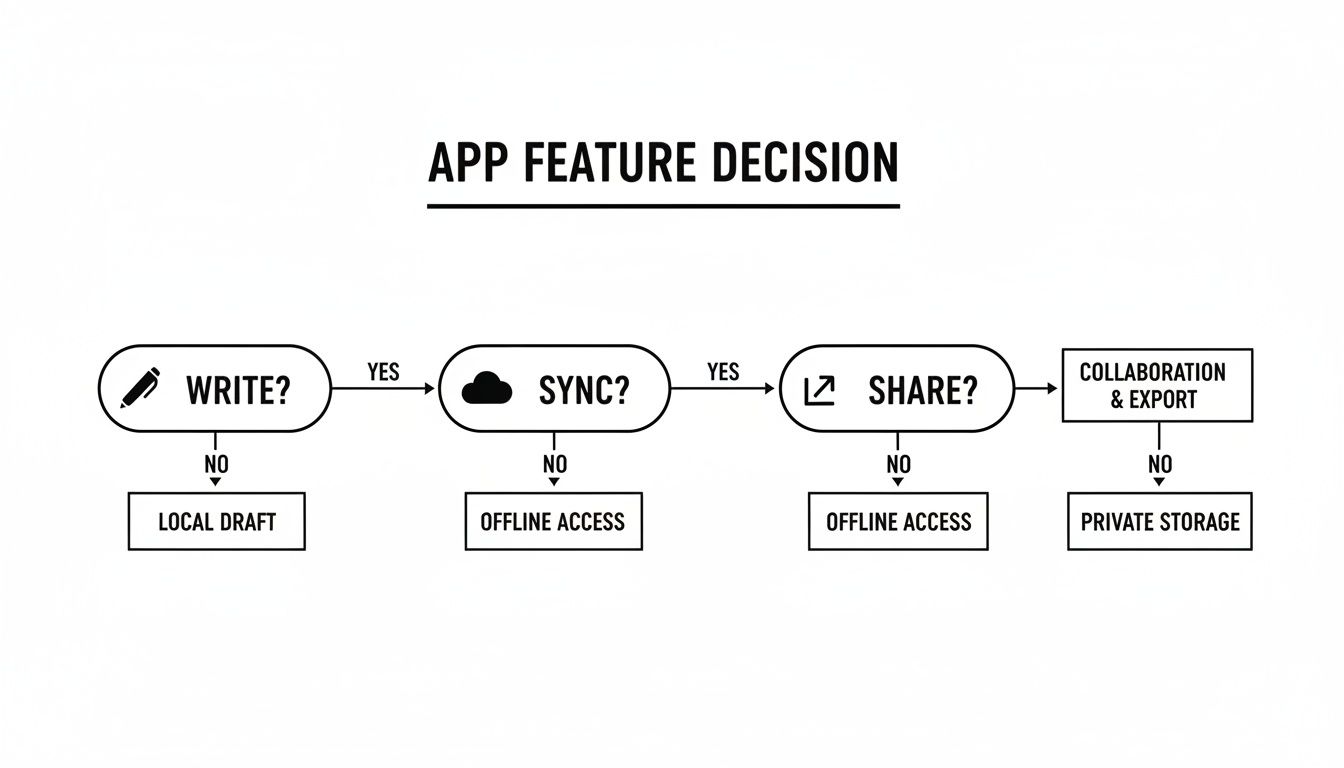
يوضح مخطط التدفق أن الوظائف الأساسية مثل الكتابة، والمزامنة، والمشاركة هي الأساس لنظام سهل الاستخدام.
للطلاب الذين يوازنون بين المحاضرات والبحث
يحتاج الطلاب إلى تطبيق يمكنه مواكبة دورة المحاضرات والبحث والتحضير للامتحانات المستمرة. تطبيق ملاحظات عادي لن يكون كافيًا.
التطبيق الذي يحتوي على تسجيل صوتي متزامن هو تغيير قواعد اللعبة تمامًا. أثناء الكتابة، يسجل التطبيق المحاضرة ويربط الصوت بخط يدك. لاحقًا، يمكنك النقر على نقطة مربكة في ملاحظاتك وسماع بالضبط ما كان يقوله الأستاذ في تلك اللحظة. يجعل الدراسة فعالة للغاية.
تحتاج أيضًا إلى تطبيق يتقن تعليقات PDF التوضيحية. هذا يتيح لك سحب شرائح المحاضرات أو أوراق البحث مباشرة إلى مفكرتك لتظليلها، والكتابة في الهوامش، ورسم المخططات. مع عرض الشاشة المنقسمة على iPad، يمكنك فتح ورقة بحث على جانب وملاحظاتك على الجانب الآخر—إعداد دراسة قوي وسهل الاستخدام حقًا.
للفنان والمفكر البصري
إذا كنت تفكر بالصور والرسومات، فأنت بحاجة إلى حرية إبداعية، وليس برنامجًا معقدًا. سير عملك يدور حول نقل الأفكار إلى اللوحة بسلاسة.
أولاً، ابحث عن لوحة رسم لا نهائية. تتيح لك هذه الميزة مساحة لا نهائية للعصف الذهني وربط الأفكار، مثل السبورة الرقمية التي لا تنفد مساحتها أبدًا. إنها مثالية لتحرير إبداعك.
بالطبع، تحتاج أيضًا إلى الأدوات الإبداعية المناسبة في متناول يدك:
- مجموعات فرش قابلة للتخصيص: القدرة على إنشاء أو استيراد الفرش أمر ضروري للفنانين الذين يحتاجون إلى كل شيء من قلم حبر دقيق إلى غسلة ألوان مائية ناعمة.
- لوحات ألوان متقدمة: ابحث عن تطبيق يتيح لك إنشاء وحفظ واستيراد لوحات الألوان الخاصة بك لضمان أن يكون عملك دائمًا بالمزاج المناسب.
- دعم الطبقات: تمامًا كما في البرامج الاحترافية، تتيح الطبقات فصل عناصر الرسم، مما يجعل تعديل الرسومات المعقدة سهلاً دون الحاجة للبدء من جديد.
بالنسبة للمفكر البصري، التطبيق المناسب ليس مجرد أداة—بل هو استوديو رقمي يجعل الإبداع سهلاً.
للمحترف الذي يدير المشاريع والاجتماعات
يحتاج المحترفون إلى الكفاءة والأمان والتعاون السلس. تدور أيامهم حول تسجيل ملاحظات الاجتماعات، وتتبع المهام، ومشاركة المعلومات مع الفريق.
المزامنة عبر الأنظمة الأساسية القوية أمر لا يمكن التفاوض عليه. يحتاج المحترف إلى تدوين الملاحظات على جهاز iPad أثناء الاجتماع وأن تظهر فورًا على جهاز Mac أو الكمبيوتر الشخصي بنظام Windows في المكتب. يجب أن تكون المزامنة سريعة وخالية من العيوب لتكون عملية.
قدرة التطبيق على التكامل مع أدوات أخرى هي ما يرفعه من مجرد مفكرة بسيطة إلى مركز رئيسي للإنتاجية. هذا يجعل الحياة أسهل من خلال ربط ملاحظاتك بالتقويمات أو تطبيقات إدارة المشاريع.
البحث القوي أيضًا ضروري. القدرة على العثور على اسم عميل أو تفاصيل مشروع من اجتماع قبل ستة أشهر في ثوانٍ توفر وقتًا هائلًا. لأولئك الذين يتنقلون بين الكتابة اليدوية والطباعة، تجعل لوحة المفاتيح الخارجية كل الفرق. يمكنك استكشاف كيف تعزز لوحة مفاتيح SpacePad Pro للآيباد الإنتاجية في دليلنا المفصل.
كيف ترفع الإكسسوارات المناسبة من مستوى تدوين الملاحظات لديك
اختيار تطبيق تدوين ملاحظات رائع هو خطوة أولى قوية، لكن البرنامج هو نصف المعادلة فقط. يحدث سير عمل سلس حقًا عندما تجمع بين هذا التطبيق القوي وأدوات مادية تجعل الكتابة والرسم تبدو طبيعية تمامًا. الإكسسوارات المناسبة تسد الفجوة بين أفكارك والشاشة، مما يجعل تدوين الملاحظات الرقمية بديهيًا حقًا.
الأمر لا يتعلق بشراء الأجهزة لمجرد الشراء. بل يتعلق ببناء نظام متكامل حيث تتناغم الأجهزة والبرامج بشكل مثالي، حتى تتمكن من التركيز فقط على أفكارك.
سحر القلم الدقيق
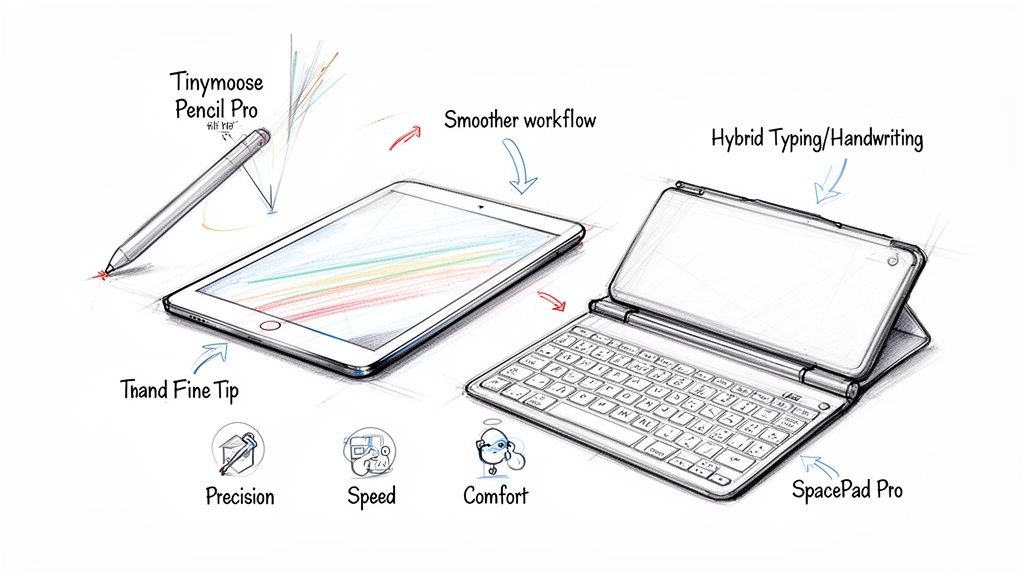
بينما يمكنك استخدام إصبعك، فإن القلم عالي الجودة هو ما يفتح حقًا إمكانيات الكتابة اليدوية في التطبيق، مما يجعل الحبر الرقمي يشعر بطبيعية القلم على الورق.
قلم دقيق مثل Tinymoose Pencil Pro 2 هو الأفضل في مجاله، مصمم للقضاء على الإحباطات الشائعة في الكتابة الرقمية. دقته المثالية تعني أن خطوطك تظهر بالضبط حيث تضعها، بدون أي تأخير. هذا يجعل كل شيء من التعديل على ملف PDF إلى رسم مخطط يبدو مباشرًا وسلسًا.
السر الحقيقي لتجربة كتابة رقمية رائعة يكمن في ميزات مثل حساسية الميل ورفض راحة اليد. تتيح حساسية الميل إنشاء خطوط مظللة بمجرد إمالة القلم، بينما يسمح رفض راحة اليد بوضع يدك على الشاشة دون ترك علامات عشوائية. هذه التفاصيل تحدث فرقًا كبيرًا في الاستخدام اليومي والعملي.
تحويل جهاز الآيباد الخاص بك إلى محطة عمل هجينة قوية
بينما الكتابة اليدوية رائعة للعصف الذهني، هناك لحظات تتطلب سرعة لوحة المفاتيح الفعلية. لوحة مفاتيح محمولة جيدة تحول جهاز الآيباد الخاص بك فورًا إلى محطة عمل هجينة، جاهزة لأي مهمة.
مع لوحة مفاتيح مثل SpacePad Pro، يمكنك كتابة محاضر الاجتماعات التفصيلية بسهولة. ثم، عندما يحين وقت العصف الذهني، يمكنك استخدام القلم الخاص بك لرسم مخطط انسيابي دون انقطاع. هذه هي المرونة التي تجعل من الآيباد أداة قوية وعملية للعمل الحديث.
تعني هذه الطريقة المختلطة أنه يمكنك استخدام تطبيق تدوين الملاحظات المفضل لديك بالطريقة الأكثر كفاءة في اللحظة.
- للكتابة الطويلة: لوحة المفاتيح هي أفضل صديق لك عند صياغة التقارير أو الرسائل الإلكترونية الطويلة.
- للتعليقات السريعة: يمنحك القلم الرقمي الدقة التي تحتاجها لوضع علامات على المستندات.
- للعصف الذهني الإبداعي: لا شيء يتفوق على حرية القلم الرقمي في رسم الخرائط الذهنية والرسم التخطيطي.
القدرة على التبديل بين الأوضاع تعني أنك تستخدم دائمًا الأداة الأكثر كفاءة للعمل. لمساعدتك في الاختيار، دليلنا حول أفضل قلم رقمي لجهاز iPad في 2026، تم اختباره وتصنيفه، يشرح جميع الخيارات الرائدة.
إنشاء نظام كامل وفعال
في النهاية، الهدف هو بناء إعداد طبيعي لدرجة أنك تنسى وجوده. الجمع بين تطبيق رائع والإكسسوارات المناسبة يزيل كل الاحتكاك من سير عملك، مما يسمح لأفكارك بالتدفق دون انقطاع. دقة أفضل قلم رقمي وكفاءة لوحة مفاتيح سريعة الاستجابة ليست مجرد ترقيات بسيطة؛ بل هي ما يفتح الإمكانات الحقيقية لجهاز iPad ويجعل حياتك أسهل.
عندما تستثمر في هذه الأدوات، فإنك تبني نظامًا شخصيًا وفعالًا يجعل عملك ومشاريعك الإبداعية أكثر متعة.
اتخاذ قرار ذكي على المدى الطويل
اختيار تطبيق لتدوين الملاحظات لجهاز iPad هو استثمار في كيفية تنظيم أفكارك وإنجاز عملك. قبل الالتزام، من المفيد النظر في التفاصيل العملية التي تميز التطبيق الجيد عن الرائع — النوع الذي سيخدمك جيدًا لسنوات قادمة.
التفكير في هذه العوامل الآن يوفر عليك المتاعب لاحقًا ويضمن أن دفتر ملاحظاتك الرقمي يمكن أن ينمو معك. دعنا ننظر إلى ما وراء الميزات اللامعة إلى الأمور التي تهم للاستخدام السهل على المدى الطويل: التكلفة، الخصوصية، والدعم.
فهم نماذج التسعير: الاشتراك مقابل الشراء لمرة واحدة
القرار العملي الأول عادةً ما يكون السعر. تطبيقات تدوين الملاحظات تأتي عمومًا بنوعين، لكل منهما مزاياه وعيوبه.
- الشراء لمرة واحدة: تدفع مرة واحدة وتمتلك تلك النسخة من التطبيق إلى الأبد. هذا رائع لتكلفة ثابتة ومتوقعة. المشكلة؟ قد تضطر للدفع مرة أخرى مقابل التحديثات الكبيرة في المستقبل.
- نموذج الاشتراك: تدفع رسومًا متكررة (شهريًا أو سنويًا) للوصول المستمر وجميع التحديثات المستقبلية. يستخدم كبار اللاعبين مثل Goodnotes وNotability هذا النموذج لتقديم تحسينات مستمرة.
فكر في كيفية استخدامك له. إذا كنت تحتاج فقط إلى أداة قوية وموثوقة تؤدي الأساسيات، فإن الشراء لمرة واحدة هو خيار بسيط وعملي. لكن إذا كنت تعتمد على الحصول على أحدث الميزات والمزامنة السلسة، فإن الاشتراك غالبًا ما يوفر قيمة أفضل على المدى الطويل وتجربة أسهل.
حماية أفكارك من خلال خصوصية بيانات قوية
ملاحظاتك تحتوي على أفكارك، وأعمالك السرية، وأفكارك الشخصية. هذه البيانات ثمينة وتستحق الحماية. قبل تنزيل أي تطبيق، ألقِ نظرة سريعة على سياسة الخصوصية الخاصة به.
لا تحتاج إلى شهادة قانونية—فقط ابحث عن لغة واضحة ومباشرة تشرح البيانات التي يجمعونها وكيف يستخدمونها.
التطبيق الذي يحترم خصوصيتك سيكون شفافًا بشأن ممارساته. ابحث عن التشفير من طرف إلى طرف، الذي يضمن أن تكون أنت فقط من يمكنه الوصول إلى ملاحظاتك، وسياسات واضحة تنص على أنهم لن يبيعوا بياناتك. هذه خطوة عملية لراحة البال.
المطور الذي يأخذ الخصوصية على محمل الجد يظهر أنه جدير بالثقة، مما يضمن أن أفكارك تظل حقًا ملكك.
حماية اختيارك للمستقبل
أخيرًا، فكر في مستقبل التطبيق. التطبيق جيد بقدر الفريق الذي يقف وراءه. المطور الذي لديه سجل قوي من التحديثات المستمرة وإصلاحات الأخطاء هو علامة رائعة على أن المنتج مدعوم جيدًا ومصمم ليصمد.
هذه هي الطريقة التي "تحمي بها اختيارك للمستقبل"، مما يضمن استمرار عمل التطبيق بسلاسة مع إصدارات iPadOS الجديدة.
نظرة سريعة على سجل إصدار التطبيق في متجر التطبيقات أو مجتمع مستخدمين نشط على Reddit يمكن أن تخبرك بالكثير. التحديثات المتكررة والمهمة تظهر أن المطور ملتزم. اختيار تطبيق مدعوم جيدًا يعني أنك لا تختار أداة لليوم فقط، بل شريكًا موثوقًا للغد.
خطتك البسيطة لتدوين الملاحظات الرقمية بسهولة
حسنًا، لقد غطينا الكثير. اختيار من بين العشرات من تطبيقات تدوين الملاحظات على الآيباد لا يجب أن يكون مربكًا. دعنا نجمع كل شيء في خطة واضحة وبسيطة يمكنك استخدامها الآن لجعل حياتك أسهل.
الهدف ليس فقط اختيار تطبيق؛ بل بناء نظام يبدو طبيعيًا لدرجة أنك بالكاد تلاحظه، مما يتيح لأفكارك التدفق بدون أي عوائق.
خطة العمل ذات الثلاث خطوات الخاصة بك
بناء إعدادك المثالي لتدوين الملاحظات الرقمية سهل مثل واحد، اثنان، ثلاثة. اتبع هذه الخطوات، وستنتقل من التردد إلى الإنتاجية في وقت قصير.
-
اكتشف ما تقوم به فعليًا أولاً، كن صادقًا بشأن روتينك اليومي. هل أنت طالب تحاول متابعة المحاضرات؟ محترف يعلّق على تقارير العملاء؟ أم فنان يرسم لوحة قصة لفكرة؟ تحديد نشاطك الرئيسي يوجهك فورًا نحو التطبيقات المصممة لجعل هذه المهمة أسهل.
-
استخدم قائمة التحقق من الميزات بعد ذلك، اختبر أفضل التطبيقات التي تفكر فيها باستخدام قائمة التحقق من الميزات الأساسية. ما مدى جودة دعم القلم؟ هل يمكنك تنظيم الملاحظات بسهولة؟ هل يعمل البحث بالكتابة اليدوية فعلاً؟ هذا هو اختبارك العملي للتأكد من أن التطبيق قوي وسهل الاستخدام كما يدعي.
-
أكمل إعدادك أخيرًا، اجعل التجربة سلسة بإضافة الأدوات المناسبة. قلم دقيق مثل Tinymoose Pencil Pro 2 هو الأفضل لجعل الكتابة تشعر وكأنها بالقلم على الورق، بينما لوحة مفاتيح جيدة تنقذك عند الكتابة. هذه ليست مجرد إضافات؛ بل هي ما يحول التطبيق الجيد إلى تجربة مذهلة وسهلة.
في النهاية، أفضل نظام هو الذي بالكاد تلاحظه لأنه ببساطة يعمل. من خلال معرفة ما تحتاجه، واختيار الميزات المناسبة، والحصول على الأدوات الصحيحة، تخلق جسرًا سلسًا بين أفكارك وصفحتك الرقمية.
هل لا تزال لديك أسئلة؟ دعنا نوضح الأمور
الانخراط في عالم الملاحظات الرقمية قد يبدو خطوة كبيرة. من الطبيعي أن تكون لديك بعض الأسئلة. إليك إجابات واضحة لتسهيل قرارك.
هل القلم الرقمي ضروري حقًا لملاحظات iPad؟
بينما يمكنك دائمًا الكتابة، فإن قلمًا عالي الجودة مثل Tinymoose Pencil Pro 2 يغير قواعد اللعبة تمامًا. إنه الفرق بين مجرد النسخ والتفاعل الحقيقي مع أفكارك.
مع القلم الرقمي، يمكنك رسم خريطة ذهنية، أو تمييز ملف PDF، أو فقط الاستمتاع بتدفق الكتابة اليدوية. بالإضافة إلى ذلك، مع تقنية رفض راحة اليد، يمكنك وضع يدك على الشاشة دون ترك علامات عشوائية، مما يجعل التجربة طبيعية تمامًا. للمفكرين بصريًا، القلم الرقمي ليس مجرد إضافة لطيفة—بل هو ضروري لسهولة الاستخدام.
الشراء لمرة واحدة مقابل الاشتراك: أيهما أفضل؟
الأمر يعتمد حقًا على ما هو أكثر عملية بالنسبة لك. الشراء لمرة واحدة يشبه شراء مطرقة موثوقة. تدفع مرة واحدة، وتؤدي عملها بشكل موثوق، وتعرف ما ستحصل عليه. إنه مثالي إذا كنت تريد مجموعة ميزات ثابتة بدون تكاليف مفاجئة.
الاشتراك، من ناحية أخرى، يشبه عضوية النادي الرياضي. تحصل على الوصول إلى جميع الميزات الجديدة، والتحسينات المستمرة، والخدمات المميزة مثل المزامنة السحابية المتقدمة. إذا كنت تريد تطبيقًا يتطور معك ويسهل حياتك بأحدث الأدوات، فالاشتراك هو الخيار الأفضل عادة.
إليك طريقة عملية لاتخاذ القرار: إذا كنت تحتاج إلى أحدث الميزات فور صدورها للحفاظ على سير عملك بسلاسة، فالاشتراك هو الخيار الأذكى لسهولة طويلة الأمد.
هل يمكنني الحصول على ملاحظات iPad الخاصة بي على جهاز Windows أو Mac؟
بالتأكيد. أفضل التطبيقات تدرك أنك لا تعيش على جهاز واحد فقط. معظم التطبيقات المميزة تقدم نسخة مرافقة لنظام macOS، والعديد منها يتيح الوصول عبر Windows من خلال تطبيق مخصص أو تسجيل دخول بسيط عبر المتصفح.
المكون السحري هنا هو مزامنة السحابة. قبل الالتزام، تحقق بسرعة من أن التطبيق يعمل بسلاسة مع جميع الأجهزة التي تعتمد عليها. بهذه الطريقة، تكون ملاحظاتك دائمًا في المكان الذي تحتاجه، مما يجعل حياتك أسهل بكثير.
هل أنت مستعد لبناء نظام لتدوين الملاحظات يعمل ببساطة؟ في Tinymoose، نصنع ملحقات عملية وجميلة التصميم تتيح لك التركيز على ما هو مهم: أفكارك. من دقة قلم Pencil Pro 2 إلى لوحات المفاتيح المدمجة، أدواتنا مصممة لجعل حياتك الرقمية سهلة وسلسة.
مشاركة:
دليلك لقلم ستايلس مع خاصية رفض راحة اليد
10 نصائح عملية لإدارة الوقت يجب على الطلاب إتقانها في عام 2026